
How to check sukanya samriddhi account balance in post office, open sukanya samriddhi account in post office, check sukanya samriddhi account details online, SSA online payment in post office, sukanya samriddhi yojana.
Sukanya Samriddhi Yojana is started by the Government of India to support the welfare and education of the girl child. This scheme was introduced in 2016, which gives an interest rate of 8.2%.
You can open an sukanya samriddhi account on the behalf of a girl child, age must be under 10 years.
To open an SSA account, the minimum deposit amount is Rs. 250 and you can deposit a maximum amount of 1.5 lakh in a financial year.
Under this sukanya samriddhi scheme, maturity period is 21 year and you can deposit amount in the first 15 years.
Open Sukanya Samriddhi Account in Post Office
Opening a Sukanya samriddhi account is a very easy process, all you need to do shows required documents with identity proof and your account will be opened by the official in no time.
Opening an SSA account at the post office is a straightforward process. You just need to carry the right documents and the branch will handle the rest.
Documents required:
- Birth certificate of the girl child
- Photograph of the girl child and guardian together
- Address proof (Aadhaar, voter ID, or any government-issued document)
- Identity proof of the guardian (Aadhaar card or PAN card)
To open sukanya samriddhi account in post office, you need to follow below steps.
1: First download application form from the official government portal or Download application form via these link.
https://rbidocs.rbi.org.in/rdocs/content/pdfs/494SSAC110315_A3.pdf
https://www.indiapost.gov.in/VAS/DOP_PDFFiles/form/Accountopening.pdf
2: Fill the required details in application form.
3: Attached all documents like Photograph of girl child and guardian together, Address proof, Aadhaar card and girl child’s birth cirtificate
4: Submit the form at your nearest post office counter along with the first deposit amount (minimum Rs. 250)
5: The post office official will process your application and open the account. You will receive a passbook with your account number and other details.
How to Check Sukanya Samriddhi Account Balance in Post Office
There are two ways to check your SSA balance online. The first is through the new POSB Seva ePassbook portal, which is the easier method and does not require you to have internet banking activated. The second is through the India Post internet banking portal.
Method 1 – POSB Seva ePassbook (No Internet Banking Required)
India Post launched the ePassbook service in 2025, and it is now the simplest way to check your SSA balance. You just need your registered mobile number and account number.
Step 1: Go to the official POSB Seva portal: https://posbseva.indiapost.gov.in/indiapost/signin
Step 2: Enter your registered mobile number and the captcha shown on the screen.
Step 3: You will receive an OTP on your mobile number. Enter it and click on verify.
Step 4: After verification, the dashboard will open. Click on the ePassbook icon.
Step 5: Enter your SSA account number and your registered mobile number again.
Step 6: Complete the captcha and click proceed.
Step 7: Choose Balance Enquiry or Mini Statement as per your need. Your SSA balance and account details will appear on the screen immediately. You can also download the mini statement if needed.
Method 2 – India Post Internet Banking
Via post office internet banking you can check sukanya samriddhi account details online. We have published a post regarding how to activate post office internet banking service.
Post office internet banking provides many services online like a loan on RD, PPF account, etc. Let’s see how you check SSA balance in the post office.
Step 1: First visit post office ebanking official website via this link: https://ebanking.indiapost.gov.in
Step 2: Here, you need to login to DoP ebanking portal via your User ID.
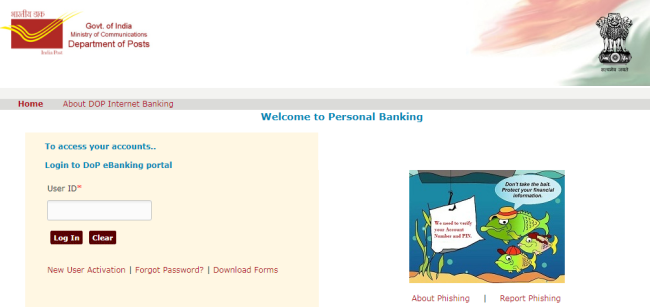
For this, you must have activated post office internet banking service.
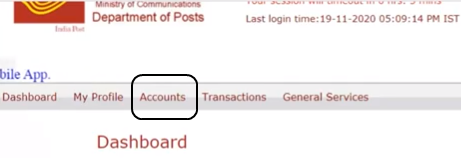
Step 3: After logging in portal, a dashboard will open in front of you. Now you need to click on ‘Account’ menu option as showing in the below image.
Step 4: Then, click on ‘SSA Account’ option at left side menu.
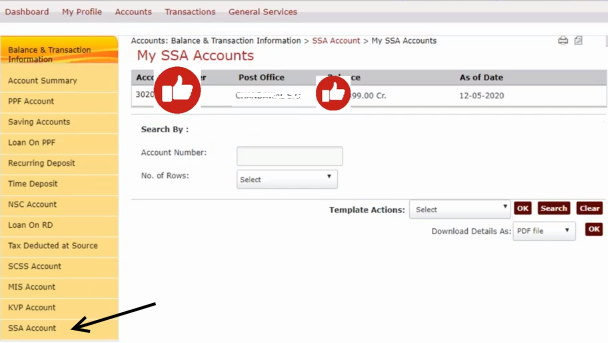
After this, ‘My SSA Account’ page will be displayed on the screen. Here your sukanya samriddhi account details are showing like account number, account balance etc.
Also Read:
Soil Health Card Scheme: Apply Online, Benefits & Parameters
UP Sewayojan Registration 2021 – Rojgar Mela
Self Help Group (SHG ) Registration Process and Benefits
Sukanya Samriddhi Online Payment in Post Office
You can do online payment to ssa post office account through internet banking.
1) Open ebanking India post office portal and logged in via your user ID.
2) Now click on ‘Transactions’ menu option. At the left side menu click on ‘SSA Contribution’ link.
Here you you do direct deposit in your SSA from your PO account.
3) To initiate SSA funding, choose account details, financial year and your Post office account from the drop down list.
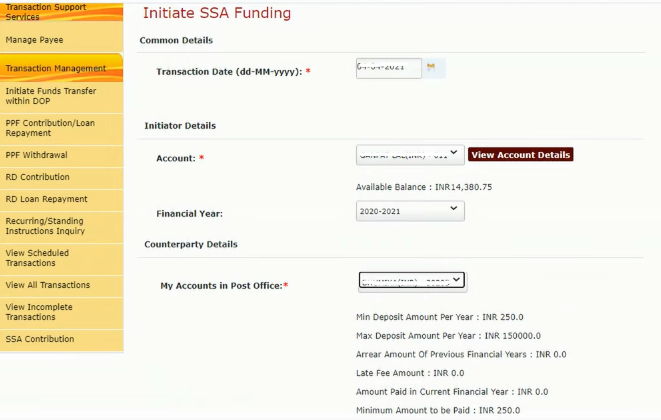
4) Fill the amount to pay and transaction remark, click to continue.
After the confirmation details, enter your transaction password and submit it. That’s it.