
Did someone take your fingerprint at a SIM shop or a ration centre without your permission? Or are you worried that your Aadhaar details are being misused somewhere?
There is one thing you can do right now to stop that, lock your Aadhaar biometrics.
It is a free feature by UIDAI that blocks all fingerprint, iris and face-based authentication on your Aadhaar. No one, not even a telecom operator or a bank can verify you using biometrics until you unlock it yourself.
You can check how many SIM Cards active on your aadhar card number. Here is everything you need to know.
What is Aadhaar Biometric Lock?
Aadhaar biometric lock is a security feature provided by UIDAI. When you enable it, your fingerprints, iris scan and face are all blocked for authentication purposes.
This means:
- No one can use your Aadhaar biometrics to get a new SIM card in your name
- No unauthorized e-KYC or bank account opening is possible
- Even if someone has your Aadhaar number, they cannot misuse your biometrics
OTP-based authentication still works normally after locking. Only biometric authentication gets blocked.
Important: Your registered mobile number is required to use this service. If your number is not linked to Aadhaar, visit your nearest Aadhaar Seva Kendra to update it first.
Two Types of Aadhaar Lock – Know the Difference First
| Feature | Biometric Lock | Aadhaar UID Complete Lock |
|---|---|---|
| What gets blocked | Fingerprint, iris and face only | ALL authentication – biometric, OTP, demographic |
| OTP-based services | Still work normally | Completely blocked |
| Unlock requirement | OTP on registered mobile | Latest 16-digit VID (mandatory) |
| Unlock duration | Temporary – 10 minutes only | Stays unlocked until you lock again |
| Best for | Everyday protection from biometric misuse | Complete Aadhaar dormancy |
Important Note: Use Biometric Lock for regular protection. Use Aadhaar UID Lock only when you want your Aadhaar number fully dormant and only after you have saved your VID.
Read Detailed Guide: Update Aadhaar Card Online – Name, Address & More
What is Virtual ID (VID) and Why It Matters
VID is a 16-digit temporary number generated by UIDAI and linked to your Aadhaar. It can be used instead of your actual Aadhaar number for authentication.
VID is mandatory for Aadhaar UID Lock/Unlock. Without your latest VID, you cannot unlock a locked Aadhaar UID. Always generate and save it before you lock the UID.
How to Generate Your VID:
Via myAadhaar Portal: Go to myaadhaar.uidai.gov.in → Aadhaar Services → Virtual ID (VID) Generator → verify with OTP → your 16-digit VID is shown on screen
Via SMS: Send GVID <last 4 digits of Aadhaar> to 1947 Example: GVID 5678 – VID will be sent to your registered mobile
Forgot VID? Retrieve it: Send RVID <last 4 digits of Aadhaar> to 1947
Save your VID somewhere safe. If you lock your Aadhaar UID and then lose the VID, you cannot unlock it online. Also check how to order Aadhaar PVC Card
Part 1 – How to Lock Aadhaar Biometrics Only
This only blocks biometric authentication fingerprint, iris and face. Your OTP-based services and government portal logins continue to work normally.
Method A : Via myAadhaar Portal
Steps to Lock:
Step 1 – Open myaadhaar.uidai.gov.in in your browser. Click on Login form button.
Step 2 – Enter your 12-digit Aadhaar number and the captcha code shown on screen
Step 3 – Click Send OTP, an OTP will be sent to your Aadhaar-registered mobile number
Step 4 – Enter the OTP and log in to your myAadhaar dashboard
Step 5 – Go to My Aadhaar → Aadhaar Services → Lock/Unlock Biometrics
Step 6 – Select Lock your Biometric option (or Lock Biometrics)
Step 7 – Verify once more with OTP sent to your mobile
Step 8 – Click Submit, you will see a success message on screen and receive an SMS confirmation
Your biometrics are now locked. Any fingerprint or iris authentication attempt on your Aadhaar will be rejected with error code 330.
Steps to Unlock (Temporary – for 10 minutes):
Step 1 – Follow the same login process as mentioned above.
Step 2 – Go to Aadhaar Services → Lock/Unlock Biometrics
Step 3 – Select Unlock Biometrics
Step 4 – Tick the consent box and verify with OTP
Step 5 – Submit and your biometrics are now unlocked
Biometrics stay unlocked for 10 minutes only and auto-lock after that. You don’t need to manually re-lock.
Method B : Via mAadhaar App
The mAadhaar app is the fastest option especially useful when you need to quickly unlock before visiting a bank or a government office.
Steps to Lock via mAadhaar App:
Step 1 – Download mAadhaar from Google Play Store or Apple App Store
Step 2 – Open the app and register your Aadhaar profile with OTP verification
Step 3 – After login, tap My Aadhaar tab at the bottom of the screen
Step 4 – Tap the three dots (menu icon) at the top right corner
Step 5 – Select Biometric Settings (or Lock/Unlock Biometrics)
Step 6 – Read the note and tick the consent checkbox
Step 7 – Tap Enable Biometric Locking
Step 8 – Enter OTP sent to your registered mobile and confirm
Step 9 – Done. You will see a success confirmation on screen
Steps to Unlock via mAadhaar App:
Step 1 – Open mAadhaar and log in
Step 2 – Go to My Aadhaar → Biometric Settings
Step 3 – Tap Unlock Biometrics and tick the consent box
Step 4 – Enter OTP and confirm
Biometrics stay unlocked for 10 minutes and auto-lock again.
Part 2 – How to Lock Aadhaar UID (Complete Lock)
This is the stronger option. When you lock your Aadhaar UID, no authentication of any kind works – not biometric, not OTP, not demographic. Your Aadhaar number is completely dormant.
Before you start: Generate and save your VID. It is mandatory to unlock the UID later.
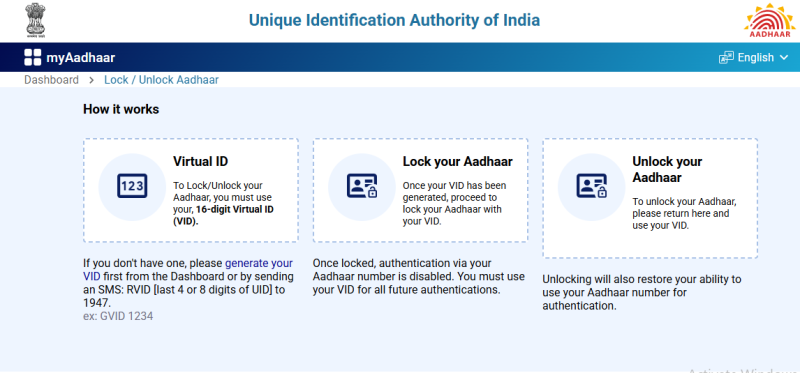
Steps to Lock Aadhaar UID:
Step 1 – First go to myaadhaar.uidai.gov.in → Aadhaar Services → Virtual ID Generator and generate your VID. Save it.
Step 2 – Now go to → Aadhaar Services → Aadhaar Lock and Unlock Service
Step 3 – Select Lock Aadhaar (UID)
Step 4 – Enter your 12-digit Aadhaar number, full name, and PIN code
Step 5 – Enter the security captcha and click Send OTP
Step 6 – Enter the OTP and submit
Step 7 – Your Aadhaar UID is now completely locked
Steps to Unlock Aadhaar UID:
Step 1 – Go to Aadhaar Services → Aadhaar Lock and Unlock Service
Step 2 – Select Unlock Aadhaar (UID)
Step 3 – Enter your 16-digit VID (NOT your Aadhaar number – VID is mandatory here)
Step 4 – Enter the captcha and click Send OTP
Step 5 – Enter the OTP and submit
Step 6 – Your Aadhaar UID is unlocked. All authentication works again.
If you lost your VID: Send
RVID <last 4 digits of Aadhaar>to 1947 to retrieve it on your registered mobile.
Check this also: How to Link Aadhaar with Bank Account Online: Step by Step Guide
When Should You Use Which Lock?
Use Biometric Lock when:
- You suspect your fingerprint was taken without consent at a SIM shop or ration centre
- You found a fake SIM registered on TAFCOP in your name
- You want protection but still need OTP-based services to work (bank portals, government sites)
Use Aadhaar UID Lock when:
- Your Aadhaar number is compromised and you want it completely shut down
- You have your VID saved and are ready to use it for unlocking later
FAQs:
No. VID is not needed for Biometric Lock or Unlock. It is only mandatory for Aadhaar UID Lock/Unlock.
Go to myaadhaar.uidai.gov.in → Aadhaar Services → Virtual ID (VID) Generator and verify with OTP. Or SMS GVID <last 4 digits of Aadhaar> to 1947.
Only 10 minutes. After that it auto-locks. You don’t need to manually re-lock.
Yes. Biometric lock only stops fingerprint, iris and face authentication. OTP-based login on government portals and banks still works.
Send RVID <last 4 or 8 digits of Aadhaar> to 1947 from your registered mobile. Your VID will be sent to you via SMS.
Yes. Both Biometric Lock and Aadhaar UID Lock/Unlock are completely free on myAadhaar portal and mAadhaar app.