
Sahyog Portal is the Bihar Government’s online grievance system, officially known as Sahyog RTMS (Real Time Monitoring System). Bihar residents can use sahyog.bihar.gov.in to register complaints online about government schemes, public services, delays, pensions, non-receipt of benefits and other public issues. After submitting a complaint, you receive a unique Grievance Registration Number that you can use to track complaint status or send reminders and give feedback. Each complaint is expected to be resolved within 30 days. The portal helpline is 1100.
What is the Sahyog RTMS Portal in Bihar?
Sahyog Portal is the Bihar Government’s online system for registering and resolving public complaints. It works under the Chief Minister’s Secretariat. The full name of the portal is Sahyog RTMS (Real Time Monitoring System). The main purpose of the portal is to make it easier for people to register their complaints. Instead of visiting different government offices, citizens can file complaint online through this portal.
After lodge online complaint, the Sahyog Portal sends it to the concerned department for action. It is generally expected to be resolved within 30 days through a three level monitoring system. If the complaint is still pending, it can be automatically moved to the Chief Minister’s Secretariat for necessary action.
The official portal is sahyog.bihar.gov.in. It is available in both Hindi and English, so people can use it in the language they are comfortable with.
How to Register a Complaint on Sahyog Portal Bihar
You can lodge a complaint on the Sahyog Portal without creating an account or login. Just follow these simple steps.
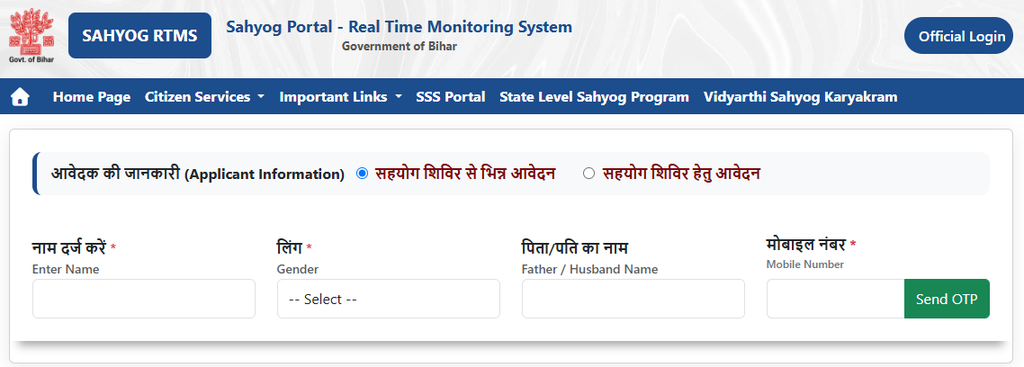
Step 1: Open the new complaint registration page
Open the official Sahyog Portal https://sahyog.bihar.gov.in and click on ‘Citizen Services’ top menu and choose ‘New Complaint’ option.
Step 2: Select the type of application
You will see two options on the complaint form:
- सहयोग शिविर से भिन्न आवेदन – Choose this option for a normal online complaint.
- सहयोग शिविर हेतु आवेदन – Choose this if you are submitting a complaint through a Sahyog Shivir camp.
Select the option that is suitable for your complaint.
Step 3: Enter your personal details
Now fill in your basic information, such as Full name, Gender, Father’s or Husband’s name and Mobile number. And then click on Send OTP button, verify it to continue the process.
Make sure you enter the correct mobile number because you may receive complaint related updates and messages on it.
Step 4: Enter your complaint details
Next, provide your complaint details. Select your district and the government department related to your issue.
Then, explain your problem clearly. Try to include important details such as the date of the issue, application number, name of the official (if known), and what action you want the department to take.
Step 5: Upload documents, if required
If you have any documents related to your complaint, you can upload them with the form. For example, you can upload an application receipt, rejection letter, or other supporting proof.
Step 6: Submit your complaint
Check all the details once before submitting the form. After you submit it, the portal will generate a Grievance Registration Number for your complaint. Keep this number safe because you may need it later to check your complaint status.
Step 7: Check the confirmation SMS
After successful registration, you will receive a confirmation SMS on your registered mobile number. The SMS will also contain your complaint reference number.
The registration process is simple and usually takes only a few minutes.
How to Check Sahyog Portal Complaint Status
After submitting your complaint, you can check its status online using your registered mobile number.
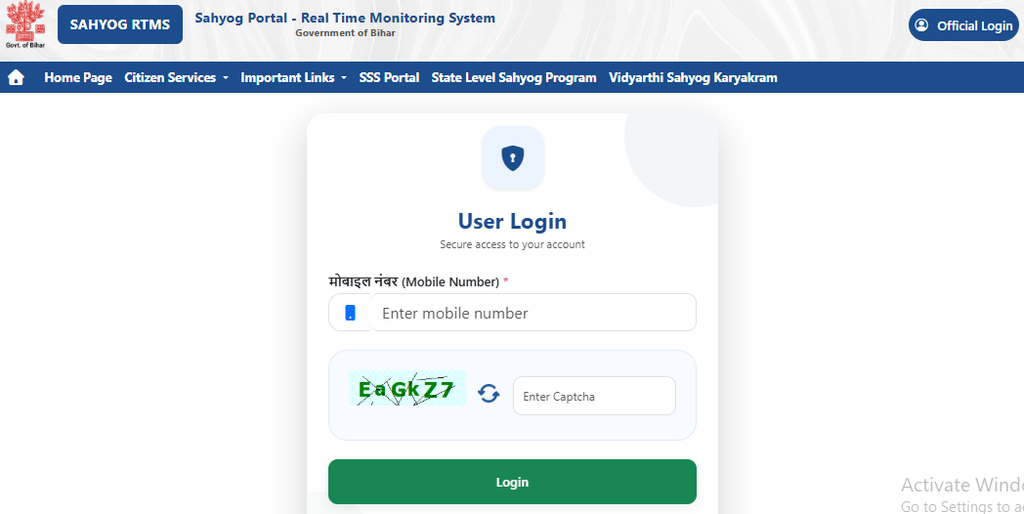
- Open the Sahyog Portal status check page: sahyog.bihar.gov.in/Sahyog/ConsolidateReport.aspx
- Enter the mobile number you used while registering the complaint.
- Enter the CAPTCHA shown on the screen.
- Click on the option to get an OTP.
- Enter the OTP received on your mobile number.
- After verification, you will see your complaint details and its current status.
The status page will show you which department is handling your complaint and whether it is pending, resolved, or escalated.
If you have sent a reminder or given feedback about an old complaint, you may also be able to see those details using the same registered mobile number.
Details Required to File a Complaint Online
To register a complaint on the Sahyog Portal, you need to provide basic personal and complaint related details, such as:
- Name and mobile number
- Address or district
- Concerned department detail
- Details of your complaint
- Supporting documents, if required
Enter the details correctly before submitting your complaint.
What Happens After Register a Complaint?
After file a complaint on the Sahyog Portal, it is sent to the concerned government department. The department checks your complaint, takes the required action, and updates its status on the portal.
The portal also provides updates and may escalate a complaint if it is not resolved within the given time. The time taken to resolve a complaint can be different depending on the department and type of complaint.
If your complaint is still pending, you can check its latest status on the portal. You can also use the reminder option, if it is available for your complaint, to follow up with the department.
How to Send Reminder for a Pending Sahyog Complaint
If your registered complaint hasn’t received the desired action, you can send a reminder to the concerned department:
- Open the official Sahyog RTMS Portal: https://sahyog.bihar.gov.in.
- Select the Send Reminder option.
- Log in to the portal using your registered mobile number
- Enter your Grievance Registration Number and other required details.
- Submit the reminder
The department receives a notification and is expected to respond to reminded complaints on priority.
How to Give Feedback on Sahyog Portal
After your grievance is resolved, you can use the Sahyog Portal to share your feedback about the service.
- Visit the official Bihar Sahyog Portal: Open sahyog.bihar.gov.in.
- Open the Feedback option: Look for the Feedback option on the portal and login via your registered mobile number.
- Enter your details: Provide the required complaint or reference details.
- Submit your feedback: Enter your feedback about your complaint and submit the form.
Make sure you enter the correct details so the portal can link your feedback to the relevant complaint.
Bihar Sahyog Portal Helpdesk
| Detail | Information |
|---|---|
| Helpline Number | 1100 |
| Available Hours | 8:00 AM – 8:00 PM (All Working Days) |
| [email protected] | |
| Address | Chief Minister Secretariat, 4, Deshratna Marg, Patna – 800001, Bihar |
If you are unable to register your complaint online, you can also visit your nearest Common Service Centre (CSC) or the District Public Grievance Cell in your district.
Frequently Asked Questions
No. Filing a complaint on the Bihar Sahyog Portal is completely free of charge.
The official website is sahyog.bihar.gov.in
1100 is the Sahyog Portal helpline. Working hours are 8:00 AM to 8:00 PM on working days.
Related to government schemes, public services, delays in services, non-receipt of benefits, misconduct of officials, infrastructure and civic issues, etc.
Each level gets 10 days. Level 1 is the concerned officer, Level 2 is the District Authority, and Level 3 is the Department Secretary. If still unresolved after 30 days total, it appears on the CM Secretariat monitoring dashboard.
The system automatically escalates it to the next level. You do not have to do anything.
Yes. If you are not satisfied with the resolution, you can reopen the complaint within the system and state your reasons.
Any citizen of Bihar can register a grievance through the Sahyog Portal.
Yes. You can register separate grievances for different issues. Each grievance receives its own unique registration number.