
If you want to transfer your LPG gas connection to another person’s name or move it to another city, you can do so by following the required process. For example, you may want to transfer a gas connection from your name to your wife’s name, your father’s name, or another family member. Similarly, if you are moving to another city, you may need to change your gas distributor.
The process is slightly different in both cases. In this guide, we will explain how to transfer an Indian Gas or Bharat Gas connection, what documents you need, and how to change your gas distributor.
How to Change Your Gas Distributor Online
If you are not happy with your current gas agency or want to choose another distributor near your home, you may be able to change your distributor through the current LPG distributor website.
This facility is available under the LPG portability scheme in selected areas. For example, if you have a Bharat Gas connection and want to change your current Bharat Gas distributor to another, Follow these steps:
Step 1: Visit the My LPG Website
First, open the My LPG website. You will see three LPG companies:
Select the company with which you currently have a gas connection. For example, if you have a Bharat Gas connection, click on Bharat Gas. Check below screenshot.
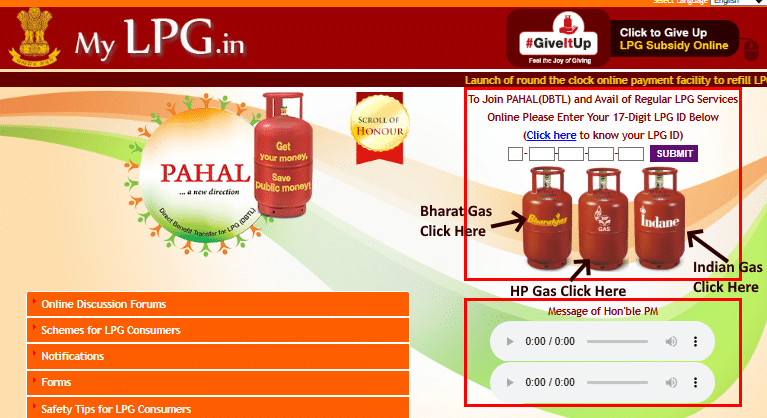
Step 2: Select Your Preferred Distributor
After opening the Bharat Gas page, look for the ‘Opt for Preferred Distributor’ option. Click on it to open the distributor portability page.
Here, you can read information about changing your current distributor. Under this scheme, you can select another distributor from the available LPG agencies in your area.
Step 3: Register on the Website
To use this facility, you need to register on the website. If you are a new user, click on the registration option. Enter the following details:
- Consumer number (available in your gas passbook).
- Registered mobile number.
After entering these details, click on Continue and complete the registration process.
Step 4: Log in to Your Account
Now login with your login ID and password, fill in the captcha code, and log in to your account.
Step 5: Select a New Gas Distributor
After logging in, you can check whether other distributors are available in your area. If the portability facility is available in your location, you will see a list of distributors from the same gas company.
Select the distributor you want to choose and submit your request. Your connection will be transferred to the selected distributor after the request is processed.
Check how to apply free ujjwala gas connection online.
How to Transfer Indane Gas Connection Online
For Indane Gas connection transfer to another gas distributor or transfer your connection to another city, you can do this via online through the official Indane Gas website.
Follow these steps to check the gas connection transfer application process:
1) First, visit the official Indane Gas website. Click on the registration or sign-in option to open your account. If you are a new user, you need to register first.
2) Click on the Register option. A registration form will open. Enter your registered mobile number and email address. Make sure you enter the same mobile number that is linked to your gas connection.
After entering these details, click on Submit. You will receive an OTP on your registered mobile number. Enter the OTP to complete your registration.
If the website shows that your mobile number is already registered, you do not need to register again. You can use the Forgot Password option to reset your password.
3) Now sign in the website with registered mobile number. Once you logged in, you will see your name and gas connection details on the dashboard.
After logging in, look for the Cylinder Information section. When you clicked on it, you could see three options:
- Portability: You could use this option to change your gas distributor without changing your address, provided another distributor was available in your area.
- Transfer Termination Voucher (TTV): This option was used when moving your gas connection from one city to another.
- Termination Voucher: This was another option available for closing or transferring a connection.
For example, if you were moving to another city, you had to select the TTV option. If you wanted to change your distributor within the same city, you could select the suitable option.
How to Change Bharat Gas Distributor Online
Follow given step by step process for bharat gas connection transfer online:
Step 1: Visit the Bharat Gas Website and look for Sign in option at the left top side.
You will see two options: Sign In and New User.
- If you already have a login ID and password, click on Sign In.
- If you do not have an account, click on New User and create your login ID and password first.
Enter your login ID and password, fill in the captcha code, and click on Login.
Step 2: After logging in, your gas connection details will appear on the screen. You can see your name, consumer number, LPG ID and other details.
Step 3: On your dashboard, You will see an option called Service Request. Click on it. Now, click on New Service Request to continue.
Step 4: After opening New Service Request, you will see the Opt for Portability option. Click on it. A list of Bharat Gas distributors near your home will appear on the screen.
Step 5: Check the list and select the Bharat Gas distributor where you want to transfer your connection. For example, if you want to change your current distributor to another agency near your home, select that agency from the list.
Sometimes, the website may not show any distributor names. This can happen if the website is not working properly. In that case, try again after some time or the next day.
Step 6: After selecting your new distributor, you need to choose a reason for changing the distributor.
Click on the reason selection option. You will see four reasons on the screen. Choose the reason that best explains why you want to change your distributor. After selecting the reason, click on Submit. Your Bharat Gas connection will be transferred to the selected distributor.
After the transfer, your consumer number may change. If it changes, Bharat Gas agency will send you a message with your new consumer number. Sometimes, your consumer number may remain the same.
Once the transfer is complete, you need to contact your new distributor for your next gas refill. You can get your cylinder refilled through the distributor you selected.
How to Transfer Gas Connection from One Person to Another
If a gas connection is registered in your name and you want to transfer another person’s name, you need to visit your gas agency. You cannot complete the name transfer process entirely online. You need to submit an application and the required documents at your gas agency.
There are two common situations in which you may need to transfer a gas connection.
When the Current Connection Holder Is Alive
If the person whose name is on the gas connection is alive and wants to transfer it to another person, they can apply for a name change.
For example, if a gas connection is registered in your name and you want to transfer it to your wife’s name, you can visit your gas agency and request a name transfer. You will need to submit an affidavit (a written statement) confirming that you willingly want to transfer the gas connection to another person.
Documents Required:
- Gas connection passbook.
- Aadhaar card of the existing connection holder.
- Aadhaar card of the person receiving the connection.
- Bank passbook of the person receiving the connection.
- Affidavit stating that you have no objection to transferring the connection.
- Application form provided by the gas agency.
Visit your gas agency with these documents. They will provide futther assistance for changing the name of gas connetion. The agency will charge name transfer fee. Ask about the applicable charges before submitting your application.
When the Current Connection Holder Has Passed Away
Sometimes, a gas connection is registered in the name of a family member who has passed away. In this situation, another family member may want to transfer the connection to their name.
Lets say, if a gas connection was registered in your father’s name and now he has passed away, you can apply to transfer gas connection in your name. You have to provide some documents to prove the death of the existing connection holder and a consent that the other family members, that have no objection regarding this transfer.
Documents Required:
- Death certificate of the previous connection holder.
- Aadhaar card of the previous connection holder.
- Aadhaar card of the person receiving the connection.
- Bank passbook of the new connection holder.
- Gas connection passbook.
- Affidavit or consent from other family members, wherever required.
- Application form provided by the gas agency.
Note: If your father had two sons and one son wants to transfer the gas connection to his name, the other son may also need to give a written consent about no objection on this.
All these documents submit to your gas agency. They will check your documents and complete the transfer process.
Frequently Asked Questions
Yes, you can transfer an LPG gas connection to another person’s name by visiting nearest gas agency with supporting documents.
There is no official transfer fee or administrative fee mentioned by oil marketing companies.
The online preferred distributor facility is meant for selecting another distributor from the available agencies in your area. If you are moving to another city, contact your current gas agency to ask about the transfer process for your new address.
Yes, customers can transfer their LPG connections online to a preferred distributor within the same area of operation or market.