
Need your GST registration certificate for a bank, vendor, or tender application? You can download it free from the GST portal in just a few minutes. You do not need a Digital Signature Certificate (DSC).
Follow this simple guide to download your GST certificate online from GST portal. It also explains how to login for the first time after GST approval, and fix common problems if your GST certificate is not showing also provide information what information does a GST registration certificate have in India.
How to Download GST Certificate from GST Portal: Step by Step
(a) Go to GST portal www.gst.gov.in and click Login at the top right.
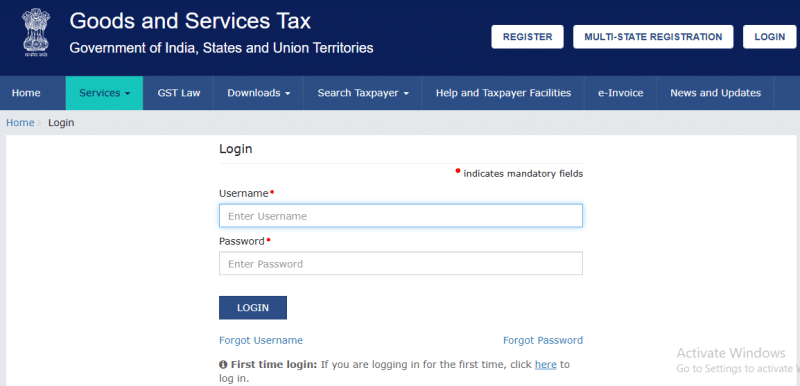
(b) Enter your your username, password, and the captcha and click login button. If you forgot your credentials then get it via “Forgot Username” option.
(c) From the top menu, open the certificates page and click on Services, then User Services, then View/Download Certificates.
(d) Now find your certificate. Look for GST Registration Certificate (Form GST REG-06). Check the issue date. The newest certificate shows first.
(e) Click the download icon. The GST Certificate PDF file saves on your device.
(f) Open the file and check your GSTIN, legal name, trade name, and addresses. If anything looks wrong, see the amendment section below.
Tip: Save every page of the GST registrtaion certificate PDF file. Banks often ask for the full file, including Annexure A and Annexure B, not just the first page.
First Time Login After GST Registration Approval
After your GST registration is approved, you receive a welcome email with your GSTIN and temporary password. Before logging in, you must create your own username and password.
- Visit www.gst.gov.in and click Login.
- Click the First Time Login option below the login box.
- Enter your Provisional ID / GSTIN / UIN, temporary password received by email, and captcha.
- Create a new username and password when asked.
- Log in with your new details and follow the steps above to download your GST certificate.
Can You Download a GST Certificate Without Login?
No, you need to login to your GST account to download the GST certificate PDF online.
However, you can check GST details without logging in. Go to the GST portal homepage and select Search Taxpayer. Enter the GSTIN and captcha to view the business name, registration status, and other basic details.
This option is useful when you want to check whether a supplier’s GST number is valid. However, you cannot download the REG-06 certificate this way.
Forgot Your GST Portal Account Access?
If you forgot your GST portal account login details, you can recover them from the portal.
For a forgotten username, click Forgot Username on the login page and follow the instructions. You will receive an OTP on your registered mobile number or email.
If you forgot your password, click Forgot Password, enter your username, verify the OTP, and set a new password. You can then log in and download your GST certificate.
What if You Lost Your Registered Mobile Number or Email?
The GST portal sends OTPs to your registered mobile number or email. If you no longer have access to them, you cannot reset your login details online.
Contact your local GST office to update your contact details. You can also check with the CA or agent who registered your business, as they may have used their own mobile number or email.
Avoid Third Party GST Certificate Download Websites
You will find many websites that claim you, download a GST certificate online by entering your GST number. Be careful when using them. Official GST certificate is available only through your GST account on the government portal. Other websites may only show basic GST details or collect your business information.
If a bank or vendor asks for your GST certificate, always download the original REG-06 certificate from the official GST portal.
Read our guide on: How to Open a GST Suvidha Kendra
What Information Does a GST Registration Certificate Have
Your GST certificate (Form GST REG-06) contains your business details. It has three parts:
1. Main Page (GST REG-06)
The first page shows your main registration details, such as:
- GSTIN (15-digit GST number)
- Legal name and trade name
- Type of business (proprietorship, partnership, company, etc.)
- Main business address
- GST registration type
- Registration start date and validity
- Certificate issue date and approval details
2. Annexure A – Additional Business Addresses
This page shows your other registered business locations, such as branches, offices, and warehouses.
3. Annexure B – Business Owners and Partners
This page contains details of the proprietor, partners, or company directors.