
Post Highlights
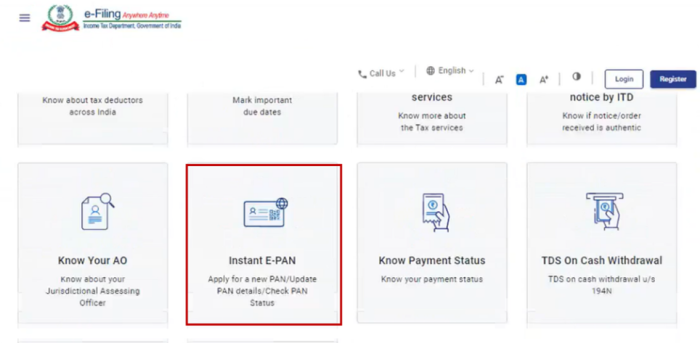
If you do not yet have a PAN card than a useful service Instant e-PAN Card provided by the Income Tax Department. You can generate your PAN online – free of cost and without submitting any physical documents.
This post explains, how to get an instant e-PAN using Aadhaar, who is eligible, what you need beforehand, and how to download or update your e PAN card later.
What is Instant e-PAN?
Instant e-PAN is an online service available on the Income Tax e-Filing portal that allows individuals to get a digitally signed PAN in electronic format (PDF) using Aadhaar based e-KYC.
This service is especially useful if you urgently need a PAN for:
- Opening a bank account
- Filing income tax returns
- Investing in mutual funds or shares
- Completing KYC for financial services
The best part is that the entire process is paperless, login-free, and completely free.
Who Can Apply for Instant e-PAN?
Before starting, make sure you meet the eligibility criteria. You can apply if:
- You are an individual taxpayer
- You do not already have a PAN
- You have a valid Aadhaar card
- Your mobile number is linked with Aadhaar
- You are not a minor on the date of application
Note: If your Aadhaar is linked to an existing PAN, the system will not allow you to create a new one.
What You Need Before Apply Instant e Pan Card Online
Keep these thing get ready:
- Your 12-digit Aadhaar number
- A mobile phone with the number linked to Aadhaar (for OTP verification)
- Stable internet access
No documents, photos, or signatures need to be uploaded.
Process to Generate a New Instant e-PAN
Step 1: Visit the Income Tax e-Filing Portal
Go to the official Income Tax e-Filing portal and select the Instant e-PAN option available on the homepage.
Step 2: Choose “Get New e-PAN”
On the Instant e-PAN page, click on Get New e-PAN to begin the process.
Step 3: Enter Aadhaar Details
Enter your 12-digit Aadhaar number, tick the confirmation checkbox, and click Continue.
Important notes:
- If your Aadhaar is already linked with a PAN, you will see an error message.
- If your Aadhaar is not linked with a mobile number, you won’t be able to proceed.
Step 4: Give Consent
Read the consent terms carefully, confirm that you agree, and continue.
Step 5: OTP Verification
You will receive a 6-digit OTP on your Aadhaar-linked mobile number.
- OTP is valid for 15 minutes
- You get 3 attempts to enter it correctly
- You can resend OTP if needed
Enter the OTP and proceed.
Step 6: Validate Aadhaar Details
Your Aadhaar details will be shown on screen. Accept the declaration and continue.
At this stage, you may also:
- Link or validate your email ID (optional but recommended)
Once submitted successfully, you will see a confirmation message with an Acknowledgement Number. This number is important for tracking your request later.
In most cases, the e-PAN is generated almost instantly.
How to Update PAN Details Using Aadhaar e-KYC
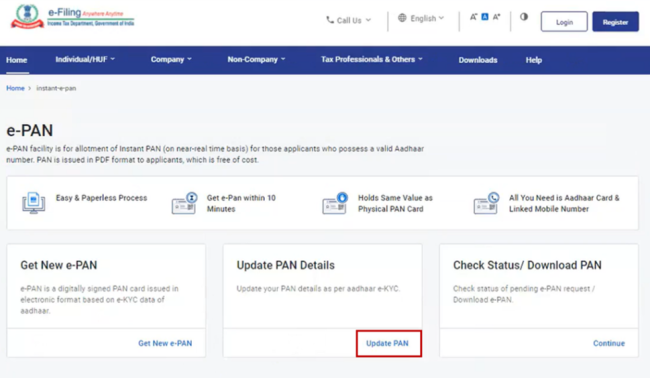
If you already have a PAN but want to update it as per Aadhaar e-KYC, the Instant e-PAN service also supports this.
Steps to Update PAN Details:
- Go to the e-Filing portal and select Instant e-PAN
- Click on Update PAN
- Enter your Aadhaar number and verify it using OTP
- Aadhaar e-KYC details and existing PAN details will be displayed
- Select the details you want to update
You can update:
- Name
- Photo
- Date of Birth (only if Aadhaar has the full DOB)
- Mobile number (updated by default)
- Email ID (requires validation)
- Address
Confirm the changes and submit. You will receive an acknowledgement number and confirmation via SMS or Email.
How to Check e-PAN Status or Download e-PAN (Without Login)
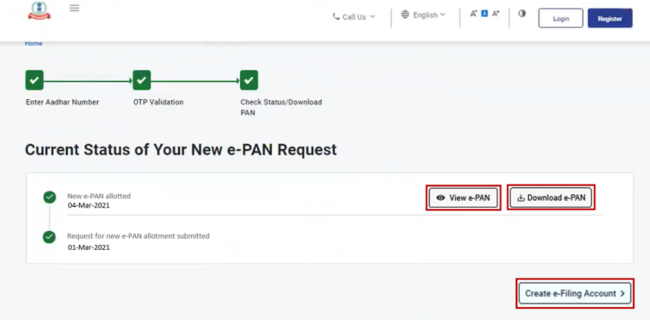
You can track or download your e-PAN even without logging in.
Steps:
- Go to Instant e-PAN on the e-Filing portal
- Choose Check Status / Download PAN
- Enter your Aadhaar number
- Verify using OTP
- View the current status
If your e-PAN has been generated, you can:
- View e-PAN
- Download e-PAN (PDF)
- Create an e-Filing account
Download Instant e-PAN Card After Logging In
Once you register and log in to the e-Filing portal, you can download your instant e-PAN card anytime.
Steps:
- Log in to the e-Filing portal
- Go to Dashboard > Services > View / Download e-PAN
- Enter Aadhaar number
- Verify with OTP
- Download or view your e-PAN
This is useful if you misplace your earlier copy or need it again in the future.
Important Points to Remember
- Instant e-PAN is only for individuals, not firms or companies
- The service is free of cost
- PAN is issued in electronic format only
- Physical PAN card can be applied separately later if needed
- Email validation may be compulsory during e-Filing registration
Final Thoughts
The Instant e-PAN service made PAN issuance process faster, simpler, and more accessible than ever. Whether you are a student, freelancer, salaried employee, or first-time taxpayer, you can now get your PAN in minutes using just Aadhaar and a mobile OTP.