
A birth certificate is one of the most important documents an Indian citizen will ever need. In the past, many people treated it as optional something you get for school admission and then forget about. That has now changed completely.
Since October 2023, the Registration of Births and Deaths (Amendment) Act, 2023 has made the birth certificate the primary proof of date of birth for school admissions, Aadhaar enrolment, passport applications, driving licence, voter ID, and government jobs. For anyone born on or after 1 October 2023, a birth certificate issued under this Act is now the only accepted proof for a fresh passport application.
If you still need to register a birth, or simply download your existing certificate, this guide covers everything clearly and step by step.
Why is a Birth Certificate Important?
Under the RBD Amendment Act 2023 (effective from 1 October 2023), a single digital birth certificate now works as the approved document for:
- School and college admissions
- Applying for Aadhaar card
- Passport (mandatory for those born on or after 1 Oct 2023)
- Voter ID registration
- Driving licence application
- Government job appointments
- Marriage registration
Documents Required
The exact documents can vary slightly between states, but these are the standard requirements:
For Newborns (Registered Within 21 Days)
- Hospital Birth Proof (Form 4)
- Father’s Aadhaar Card
- Mother’s Aadhaar Card
- Address Proof
For Late Registration (After 21 Days), need to submit Affidavit from parents (Explaining the reason for delay, signed before a notary)
How to Apply Birth Certificate Online
The official portal for birth certificate apply online in India is the Civil Registration System (CRS) portal, managed by the Registrar General of India under the Ministry of Home Affairs.
Official Website: dc.crsorgi.gov.in
Step 1: Create Your Account
Go to dc.crsorgi.gov.in and click on top left Login drop down and choose “General Public Signup”. Fill in your details:
- Your name and mobile number
- Email ID (for the activation link)
- District, state, and place of birth of the child
After filling in the form, enter the captcha and click Register. You will receive an email with an activation link. Click it and set your password.
Step 2: Log In and Open Birth Registration
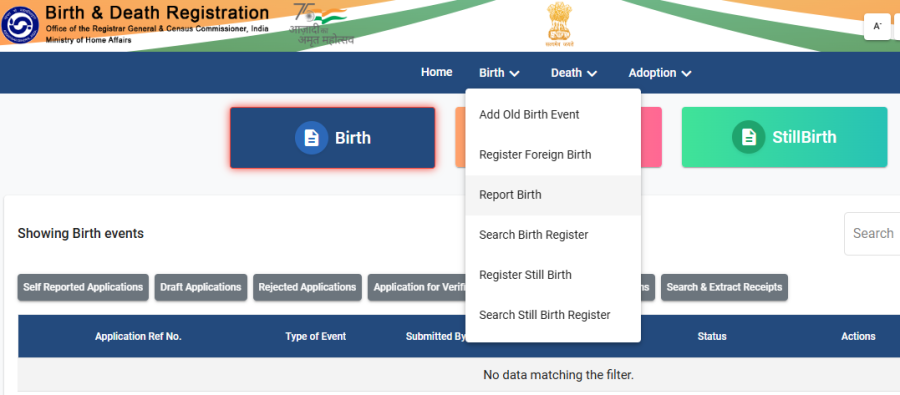
Log in with your new credentials. In the menu, click on “Birth” and then select “Report Birth”.
Step 3: Fill the Birth Registration Form
This form asks for:
- Child’s full name, gender, date and time of birth
- Place of birth (hospital name or home address)
- Father’s and mother’s full name and Aadhaar number
- Permanent address details
Fill every field carefully. Once submitted, corrections will require a separate process.
Step 4: Upload Documents
Upload scanned copies of the hospital birth proof, both parents’ Aadhaar cards, and address proof. Make sure the scans are clear and readable.
Step 5: Submit and Note Your Application Number
After submitting, you will receive an acknowledgement slip with an application/registration number. Save this, you need it to track status and download the certificate later.
The application then goes to your local registrar for verification. Processing time is typically 7 to 15 working days for timely registrations.
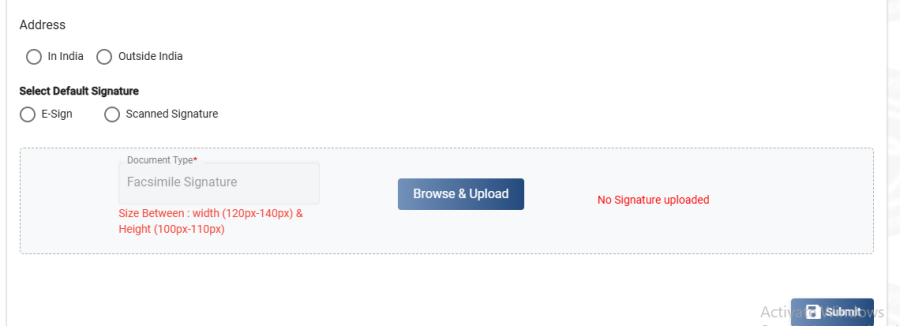
If its gives you upload signature error, while submittion than first you need to upload your signature in your profile. Go to ‘Update profile’ section from above menu link and upload you signature photo in it.
Offline Application Process
If you prefer to apply birth certificate offline, or if your area is not yet covered by the online portal:
- Visit the Municipal Corporation office (urban areas) or Gram Panchayat office (rural areas) in the jurisdiction where the birth occurred
- Collect the birth registration form (Form 1) from the counter
- Fill in the child’s details, parents’ details, and place of birth
- Attach the hospital birth report, parents’ Aadhaar cards, and address proof
- Submit the form within 21 days of birth for free registration
- The registrar will verify your documents and issue the certificate within 7 -15 working days
For hospital births, the hospital is supposed to submit the birth report to the local registrar directly. In many cases, parents only need to visit the registrar’s office to collect the certificate or request its issuance online.
Who Can Apply for a it?
The following people can apply on behalf of the child or individual:
- Parents – The father or mother can register the birth and apply for the certificate
- Guardians – Legal guardians can apply if parents are unavailable
- Head of the household – For home births, the person in whose house the birth occurred can register it
- Medical in-charge – For hospital births, the hospital or medical facility is responsible for reporting to the registrar within 21 days
- Adult individuals – Adults who were never registered at birth can apply on their own behalf
Any Indian citizen born in India, whether the birth happened in a hospital, nursing home, or at home is eligible to have their birth registered and a certificate issued.
Birth Certificate Status Check
To check the status of your application:
- Visit crsorgi.gov.in or your state’s CRS-linked portal, Login with your mobile number.
- Click on “Draft Application”
- The status will show.
How to Download Birth Certificate Online
Once your application is approved by the local registrar, you can download the certificate directly from the portal.
From the CRS Portal
- Go to dc.crsorgi.gov.in and log in to your account
- Click on “Completed Applications” or “Download Certificate”
- Select the registration and download the PDF
The downloaded certificate will have:
- A digital signature from the issuing authority
- A QR code for instant verification
- All registered details (name, DOB, parents’ names, place of birth)
This digital PDF is legally valid for all domestic purposes.
From DigiLocker
Many states now automatically push approved birth certificates to the applicant’s DigiLocker account:
- Open digilocker.gov.in or the DigiLocker app
- Log in with your Aadhaar linked mobile number
- Go to Issued Documents → look for Birth Certificate under the relevant state/municipal body
Schools and passport offices accept DigiLocker linked certificates directly.
Read our detailed guide on: How to Download Birth Certificate Online
Conclusion
Applying a birth certificate in India is now simpler and faster than it used to be, thanks to the Civil Registration System portal and the RBD Amendment Act 2023. Whether you are registering a newborn, downloading a certificate for an older child, or correcting an existing record, the process can largely be done from home.
FAQs:
Requires every birth to be reported to the local registrar within 21 days
Yes, for persons born on or after 1 October 2023.
Yes. Registering a birth within 21 days of birth is completely free.
Yes
Log in to your account on dc.crsorgi.gov.in with the same mobile number you used while applying. Go to “Draft Applications” or “Completed Applications” your submitted application will be listed there
Yes you can.