
You can check how many mobile connections are registered in your name using the TAFCOP Portal on Sanchar Saathi managed by the Department of Telecommunications, Government of India.
To check how many SIM cards registered in your name, open the official TAFCOP portal, enter your mobile number and complete the verification process using the OTP sent to your phone. After login, you can view the connections listed in your name and report any number you do not recognise.
Follow the guide below to log in to the TAFCOP consumer portal, check active mobile connections linked to your identity, and report any unknown number.
Check SIM Cards Registered in Your Name Using TAFCOP
Follow these steps to login TAFCOP consumer portal and check the list of mobile SIM cards and numbers issued under your name or Aadhaar.
Step 1: Open the official TAFCOP portal
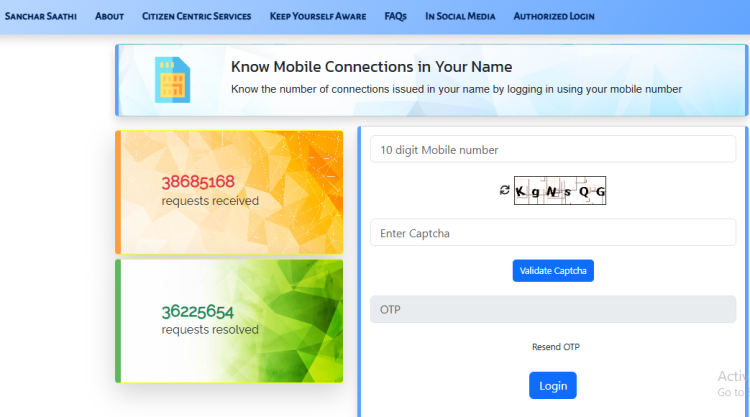
Visit tafcop.sancharsaathi.gov.in/telecomUser. You can also open the Sanchar Saathi website and select Know Mobile Connections in Your Name.
Step 2: Enter your mobile number
Enter your mobile number on the login page and click the Generate OTP button. You will receive a one time password (OTP) on your phone.
Step 3: Verify the OTP and log in
Enter the OTP and complete the verification process shown on the screen to access the service.
Step 4: Check mobile connections registered in your identity
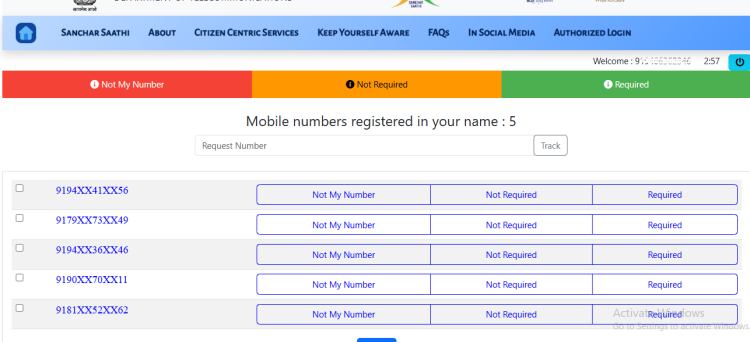
After login, check the mobile numbers listed in your name, along with the total number of connections at the top. Review the list carefully and compare it with the connections you recognise.
Step 5: Report an unknown number
If you find a number that you did not take, select Not My Number and follow the instructions to submit your report. If the number belongs to you but you no longer need it, choose Not Required instead.
You can use the official portal on a mobile phone or computer. Keep access to your phone so you can receive the OTP.
What is TAFCOP Used For?
TAFCOP stands for Telecom Analytics for Fraud Management and Consumer Protection. Check the free TAFCOP services available for mobile consumers in India through the Sanchar Saathi portal.
- Check Mobile Connections: See how many mobile numbers are registered under your Aadhaar card number.
- Report Unknown Numbers: Report SIM cards, that you did not register or no longer need. This helps you take action against unauthorised mobile connections.
- Track Reports: Get a reference number after reporting a mobile connection and use it to check the status of your request.
- Prevent Identity Misuse: Find mobile connections registered in your name without your knowledge.
- Report fraud: Alert telecom authorities to fraudulent mobile connections.
You can access the service directly at tafcop.sancharsaathi.gov.in/telecomUser or use the Sanchar Saathi mobile app to access the available telecom services.
Latest Update: On 21 September 2026, the Department of Telecommunications advised people to verify the mobile numbers registered in their name through Sanchar Saathi. DoT stated that fraudulent SIM issuance, misuse of telecom identifiers, or tampering with IMEI numbers can lead to up to 3 years of imprisonment and a fine of up to ₹50 lakh under the Telecommunications Act, 2023.
How to Report an Unknown SIM on TAFCOP
After logging in to the TAFCOP portal, check the mobile connections listed in your name. Choose the appropriate option beside each connection.
- Required – The number is yours and you want to keep it. No action needed.
- Not Required – The number is registered under your name but you want it closed (for example, an old number you no longer use).
- Not My Number – Use this if the number was never yours and you suspect it was registered fraudulently.
Follow the instructions on the screen to submit your choice. If you report a number, keep the reference or request ID displayed after submission so you can follow up later.
If you receive suspicious calls or messages, you can also use the Chakshu service to report suspected fraud.
What Happens After You Report a Number
Once you report an unrecognized number on the TAFCOP, your request is instantly forwarded to your respective Telecom Service Provider (TSP) for re-verification.
According to Sanchar Saathi, the process generally works like this:
- Within 30 days: Outgoing services, including data services, are suspended.
- Within 45 days: Incoming services are suspended.
- Within 60 days: The connection is disconnected if re-verification has not been completed successfully.
How Many Mobile Connections Can You Have?
The usual limit is nine mobile connections per person across all telecom operators. In Jammu and Kashmir, Assam and the North-Eastern states, the limit is six connections.
For example, if you have three Jio SIMs, two Airtel SIMs and two Vi SIMs, the total is seven connections.
If the TAFCOP portal shows a connection you do not recognise, review it carefully and report it using the appropriate option.
How to Check TAFCOP Report Status
After reporting an unauthorised mobile connection, you can check the current status of your report on TAFCOP. Log in again using your mobile number and OTP and look for the status of the report, that you submitted.
You can see different status updates as you check the progress of your report.
- Under Process: The report is received and is under process.
- Re-verification Initiated: The telecom operator has started the verification process for the reported connection.
- Disconnected: The telecom operator disconnects the reported connection after the verification process.
- Action Required: You may need to provide some additional information or complete another step.
Keep the reference ID you receive when submitting the report. It can help you track the complaint and refer to it if you need to contact the telecom operator later.
How to Reconnect a Disconnected Mobile Number
If your mobile number was disconnected through TAFCOP or by the Department of Telecommunications’ Digital Intelligence Unit (DIU), you can request reconnection through Sanchar Saathi.
Keep these points in mind:
- You must request reconnection within 90 days of disconnection.
- Only numbers disconnected by TAFCOP or DIU are eligible for this request.
- You can submit a reconnection request only once for a mobile number.
You can submit the request through the official Sanchar Saathi Number Reconnection service.
How to Give Feedback on TAFCOP
If you have any issue with the TAFCOP service or want to submit your feedback about your report or request, you can use the official TAFCOP Feedback service on the Sanchar Saathi portal.
The feedback form asks for your name, mobile number, email address, message and, where required, your TAFCOP request ID. You may also attach a PDF document with your feedback.
Official TAFCOP Feedback Page: Submit feedback on the official TAFCOP
Services Available on Sanchar Saathi Portal
The Sanchar Saathi portal also offers other mobile and telecom services.
| Service | What it is used for |
|---|---|
| TAFCOP | Check the number of connections issued in your name and report an unauthorised number |
| Chakshu | Report suspected fraud calls, SMS |
| CEIR | Block a lost or stolen mobile phone |
| KYM | Check the genuineness of a mobile device |
TAFCOP Helpdesk
It has customer helpdesk to assist users in case of any issues or queries related to the services offered by the portal.
Users can contact the TAFCOP customer support through the following methods:
Email: Users can send an email to [email protected] to raise their concerns or seek help.
Helpline Number: The helpline number is 011-20907480 – Timings: 9:00 AM to 5:00 PM (Monday to Friday)
Frequently Asked Questions
The official TAFCOP service is available at https://tafcop.sancharsaathi.gov.in/telecomUser. It is part of the Department of Telecommunications’ Sanchar Saathi service.
You generally need to enter your mobile number and verify it using an OTP to access the TAFCOP service. The login process described here does not require you to enter your Aadhaar number.
Open the official portal, enter your mobile number, complete the captcha if requested and verify the OTP sent to your phone. Follow the on-screen instructions to access your connections.
Log in to TAFCOP using your mobile number and OTP. Check the SIM cards issued in your name. If you find unauthorised SIM, select “Not my number” and submit the report.
Select “Not my number” and report it through TAFCOP. If the number belongs to you but you no longer need it, select “Not Required.”
No. TAFCOP is not a public SIM owner lookup service. It helps you check mobile connections issued in your own name.
TAFCOP is a government service provided through the Sanchar Saathi portal. Always make sure you are using the official sancharsaathi.gov.in website or its official TAFCOP page.
Yes. After you log in to TAFCOP, you can view the mobile connections listed in your name and the total number shown on the portal.