
Someone calls you pretending to be a bank employee and takes money from your account. Your Instagram account gets hacked, or someone starts threatening you on WhatsApp. If something like this happens, you can report it online using your phone. You don’t need to visit a police station to get started.
The Government of India has an official website for reporting cyber crimes: cybercrime.gov.in. It is called the National Cyber Crime Reporting Portal and is managed by the Indian Cyber Crime Coordination Centre (I4C) under the Ministry of Home Affairs.
In this guide, we will explain how to file a cyber crime complaint online in India and track status online.
What Is a Cyber Crime?
A cyber crime can be any crime where someone uses a phone, computer or the internet to do something wrong or harm another person. For example, someone may trick you into sending money through a fake UPI link, hack your social media account, or send you threatening messages online.
Step-by-Step Cyber Crime Complaint Process in India
Step 1: First, visit the official website https://cybercrime.gov.in/. On the homepage, click on Report Cyber Crime in the top menu and select Report a Crime from the dropdown menu.
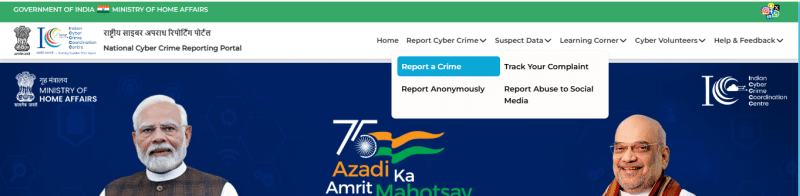
Step 2: A popup window shows, asking you to keep some information and documents ready before filing your complaint. Read the instructions carefully and keep the following things ready:
- Date and time when the incident happened.
- Details of the incident. You must write at least 200 characters. Do not use special characters such as #, $, @, ^, * or |.
- A scanned copy or photo of your ID proof, such as Aadhaar Card, PAN Card, Voter ID, Driving Licence or Passport. The file must be in JPG, JPEG or PNG format and should not be larger than 5 MB.
- If you are reporting online money fraud, keep your bank, wallet or merchant name, transaction ID or UTR number, transaction date and fraud amount ready.
- Keep screenshots and other evidence related to the incident. Each evidence file should not be larger than 10 MB.
You can also keep the suspected person’s mobile number, email address, bank account number, address, photograph or other details ready if you have them. These details are optional.
Step 3: After reading all the instructions, click on I Understand these points. The website will take you to the login page
Step 4: Enter your mobile number on the login page. You will receive an OTP on your phone. Enter the OTP to verify your number and log in to the portal.
Step 5: After logging in, follow the instructions on the screen to start your complaint. Select the appropriate crime category and enter the required details about the incident.
Step 6: Describe what happened, when it happened and how it happened. Enter the available details about the person involved, if you know them. Also, upload your ID proof and relevant screenshots or other evidence wherever the portal asks for them.
Step 7: Check all the information carefully before submitting your complaint. Once you are sure everything is correct, submit the form.
Step 8: After submitting the complaint, save your complaint acknowledgement number or complaint ID. Keep a copy of the submitted complaint for future reference. You will need the complaint ID to check your complaint status later.
What Happens After Filing the Complaint?
After submitting your complaint, you will get a complaint ID. This number confirms that your complaint has been submitted. It is not an FIR number.
The police will check your complaint and may contact you for more details. If needed, they can register an FIR and start an investigation.
For online money fraud, banks and police work together through the 1930 system to help stop the stolen money.
Remember, not every complaint becomes an FIR, and getting your money back may take time. There is no fixed time for this process. You can withdraw your complaint only before an FIR is registered.
👉 Read our guide on Find Registered SIM Cards in Your Name via TAFCOP.
How to Track Your Cyber Crime Complaint Status
After filing your complaint, you can check its status online by following these steps:
- Visit the official Cyber Crime Portal.
- Click on Track Your Complaint.
- Enter your 14 digit acknowledgement number of your cyber complaint.
- Enter the OTP sent to your mobile number and complete the captcha verification.
- Click to view your complaint status. You can check the latest action taken by the police and other details related to your complaint, including FIR status and payment details, if available.
Types of Cyber Crimes You Can Report Online
You can report different types of cyber crimes through the official portal. Some common examples include:
- Online money fraud: UPI fraud, bank fraud, credit or debit card fraud, fake payment links, SIM swap fraud and fake or spam calls.
- Social media crimes: Fake profiles, hacked accounts, online threats, cyberbullying, stalking and blackmail.
- Online scams: Fake job offers, online shopping fraud, matrimonial scams and phishing emails.
- Hacking: Hacking someone’s account, stealing personal data or changing a website without permission.
- Other online crimes: Cryptocurrency fraud, ransomware, online gambling and online trafficking.
- Women and child-related crimes: Sharing private photos without permission, sexually explicit content and child sexual abuse material.
If your problem does not match any of these categories, you can select “Any Other Cyber Crime” while filing your complaint.
FAQs
Yes, you can file a cybercrime First Information Report (FIR) at a local police station or a dedicated cyber cell.
Yes its completely free.
The national cybercrime helpline number in India is 1930. It is toll free number.
Yes. Hacked Instagram, Facebook, WhatsApp, Telegram, and email accounts can be reported through the cyber crime official portal.
Yes, a cyber complaint can be anonymous, but only for specific types of crimes (such as offenses against women and children).