
RTPS Bihar Portal: The Bihar RTPS services are available through the official ServicePlus portal. You can use the portal to apply for services, login, track your application status and download certificates online.
Official RTPS Bihar Portal: serviceonline.bihar.gov.in
You can use RTPS Bihar for services such as caste certificate, income certificate, residence certificate, EWS and other government services. You can also check your RTPS Bihar application status online after submitting an application.
What is RTPS Portal?
RTPS stands for Right to Public Service. It is an online service provided by Bihar government that allows people to apply for important certificates such as caste, income, and residential certificates. You can apply for these services online through the RTPS Bihar portal at serviceonline.bihar.gov.in.
On the portal, citizens can access services, submit applications, track an application and download certificates. The portal also provides options for registration and other citizen services.
How to Apply Online Through RTPS Portal
You can apply for RTPS services online through the Bihar ServicePlus portal. The current portal allows applicants to apply without login through available department-wise service links or apply after logging in by going to Apply for Services → View all available Services.
The portal has also been integrated with MeriPehchaan National Single Sign-On. If you use the login option, follow the current login instructions shown on the official ServicePlus portal.
Apply for Caste Certificate in Bihar
You can apply for a caste certificate in Bihar on the RTPS Bihar portal. The MeriPehchaan method is explained below. If you don’t want to login, you can also apply directly via Apply Onliine menu link.
Step 1: Create a MeriPehchaan Account
- Open serviceonline.bihar.gov.in.
- Under the Citizen section, click “Register Yourself”. A new JANPARICHAY official page will open.
- Click “Sign Up For MeriPehchaan”, just shown below sign in form
- Fill in your mobile number, name, date of birth, gender, and set a password.
- Verify with OTP and your account is ready.
If you already have an account from before, try logging in with your old password. If it does not work, create a new MeriPehchaan account.
Step 2: RTPS Login and Select Apply for Services
After login with MeriPehchaan credentials, welcome to service plus page will open. Here you see the left menu, click on ‘Apply for services‘ → ‘view all available services‘ option.
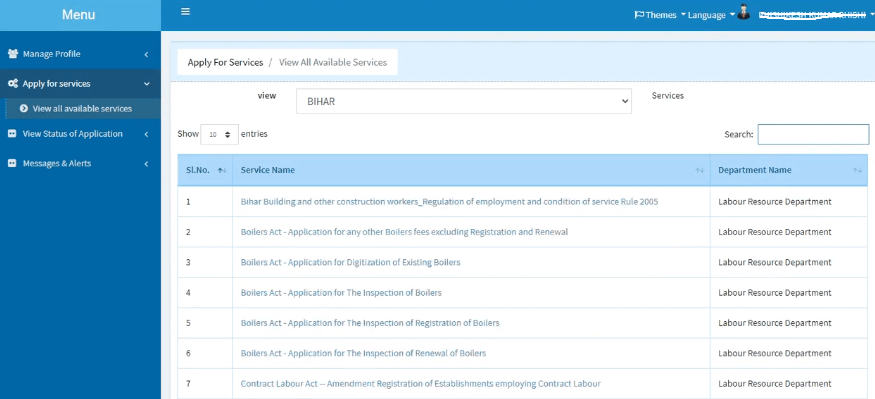
Here, all available RTPS Bihar online services are shown, you can pick anyone here.
Step 3: Fill the Caste Certificate Application Form
For caste certificate, type ‘caste’ in the search box, it will show all three options for caste certificate like at CO level, at DM level, and at SDO level. You can choose any service your need. Mostly, caste certificate at CO level is generally used, so lets click on it.
Now, the application form for issuance of the certificate will appear, fill in all details and upload your photo here.
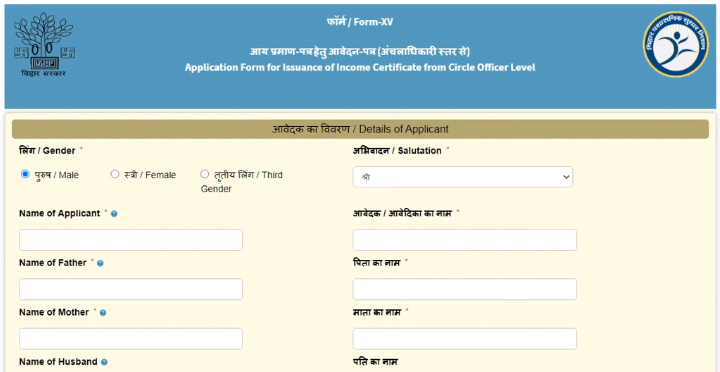
Make sure the your spelling name is exactly the same across all your documents. A mismatch between Aadhaar and ration card names is one of the most common reasons for rejection.
Step 4: Aadhaar OTP Verification
After that, click on the ‘Process’ button at the bottom to submit this application form. Now you have to verify your Aadhaar number via an OTP number. Enter received OTP number in the input box and validate it.
Step 5: Submit and Save Your Reference Number
Review everything, tick the declaration, and click Submit. You will receive an Application Reference Number, save it or take a screenshot. You will need this number to check your RTPS application status and download your certificate later.
Apply for Bihar Income Certificate
To apply for an income certificate in Bihar, you can use the RTPS Bihar portal. You do not need to log in or create an account for this process. Follow the steps below.
- Open the official portal, serviceonline.bihar.gov.in, in your browser.
- On the home page, click Apply Online in the top menu, then select RTPS Services.
- Choose General Administration Department.
- From the list, click Issuance of Income Certificate.
- The application form will open. Fill in all the details carefully, and make sure they match your documents.
- Scan the required documents and upload them where the form asks.
- Check everything once more, then click Submit.
After you submit, you will get a printout of your application. Print it and keep it safe, as you will need it to check your application status later.
How to Apply for Residential Certificate in Bihar
Residential certificate (Niwas Praman Patra) can be applied for directly on the RTPS Bihar portal. No login or registration is needed. Keep scanned copies of your documents ready before you start.
- Go to the official website, serviceonline.bihar.gov.in.
- In the top menu, hover over Apply Online, then move to RTPS Services.
- Select General Administration Department from the next menu.
- Click Issuance of Residential Certificate.
- The application form will open. Enter your details exactly as they appear in your documents, since even a small spelling mistake can delay the application.
- Upload the scanned copies of the documents asked for in the form.
- Review the form once, then click Submit.
- Take printout of your application form and keep reference number noted.
Services Available on RTPS Bihar
This portal provides many government services through the ServicePlus system. Some commonly used services are:
- Residence Certificate
- Caste Certificate
- Income Certificate
- BC/EBC (NCL) Certificate
- OBC (NCL) Certificate
- EWS Certificate
- Other government services available on the ServicePlus portal
RTPS Bihar Application Status
If you have already applied for an RTPS Bihar service, you can check the application status online. You need your Application Reference Number and application date to track the application through the portal.
Step by step process to check application status
- Open serviceonline.bihar.gov.in in your browser.
- Under the Citizen section, click “Track Application Status”.
- Choose how you want to track by Application Reference Number or by OTP/Application Details.
- Enter the required details (reference number + submission date, or your registered mobile number for OTP).
- Enter the CAPTCHA code and click Submit.
- Your status will show on screen.
How to Download Your RTPS Bihar Certificate
Once your application status shows “Approved”, your RTPS Bihar certificate is ready to download. You can download it without logging in to your account.
- Go to serviceonline.bihar.gov.in.
- Find the Citizen section and click “Download Certificate.”
- Select RTPS/Others from the dropdown menu.
- Enter your Application Reference Number and Applicant Name.
- Click “Download Certificate” to save the certificate as a PDF.
The downloaded certificate is digitally signed and can be used as a valid official document. You can also print it if needed. In most cases, the certificate becomes available for download within 24 hours after approval.
Other Ways to Get Your RTPS Certificate
You may also get your certificate through these options:
- DigiLocker: Your RTPS certificate will be available in your DigiLocker account after approval.
- SMS: You may receive a download link on your registered mobile number.
- ServicePlus Inbox: Log in to your ServicePlus account and check your inbox.
- CSC / Vasudha Kendra: If you applied through a CSC or Vasudha Kendra, you can collect the certificate from the centre.
Frequently Asked Questions
RTPS stands for the Right to Public Services, it is an official portal of Bihar Government which provides many services online
Need Application Reference Number and application date to track an application through the portal.
Common certificates like caste, income and residencial etc. Other services, including BC/EBC (NCL), OBC (NCL) and EWS certificates, are also available through the ServicePlus system.
Yes. visit serviceonline.bihar.gov.in, click “Download Certificate” under the Citizen section
An RTPS Appeal is an online service used by citizens when an application is delayed, rejected or not handled properly. The appeal process depends on the concerned service and authority.
Yes, open serviceonline.bihar.gov.in, click Apply Online → RTPS Services → General Administration Department, and choose the service you need, with no login required.
The Bihar ServicePlus portal has been integrated with MeriPehchaan National Single Sign-On If you need to login, use the login option on the official portal under ‘Citizen’ menu option.