
eKYC for Mukhyamantri Majhi Ladki Bahin Yojana is done at ladakibahin.maharashtra.gov.in/ekyc. Enter your 12 digit Aadhaar number, verify with the OTP sent to your Aadhaar-linked mobile, fill the family declarations, and submit. No login is needed. Missing annual eKYC suspends your ₹1,500 monthly payment.
If your payment has stopped or if you keep hearing “eKYC karo” but nobody explains what that means, this guide is for you.
What You Need Before Starting eKYC
You do not need to log in to the portal to complete eKYC. Keep the following ready:
| Requirement | Detail |
|---|---|
| Aadhaar number | Your 12-digit Aadhaar |
| Mobile linked to Aadhaar | OTP will be sent here |
| Family member’s Aadhaar | Father’s or husband’s Aadhaar number is required in some cases |
| Their mobile number | OTP will be sent to their Aadhaar-linked mobile too |
How to Complete Majhi Ladki Bahin Yojana eKYC Online
Direct eKYC link: ladakibahin.maharashtra.gov.in/ekyc
Go directly to this URL. Do not visit login page, not require.
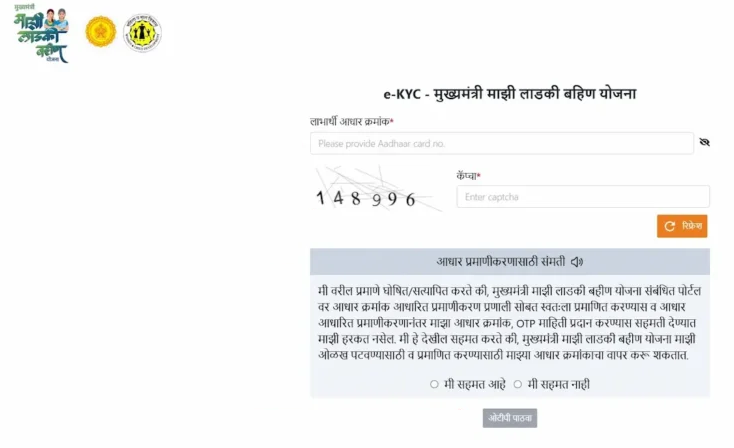
- Visit the official ladakibahin.maharashtra.gov.in/ekyc portal from your mobile or computer.
- On the eKYC page, provide your 12 digit Aadhaar number and enter the captcha displayed on the screen.
- Tick the “मी सहमत आहे” (I agree) checkbox and click “ओटीपी पाठवा” (Send OTP).
- Check your Aadhaar registered mobile number for the 6 digit OTP. Enter it on the portal and click Validate.
- You will then need to verify your father’s or husband’s Aadhaar details. Enter their Aadhaar number and complete the OTP verification using their registered mobile number.
- Read the A.S. No. 1 and A.S. No. 2 declarations carefully (see the section below this is where lakhs of women made the mistake).
- Choose the appropriate caste category, accept the final declaration, and submit your eKYC details.
- Once the process is completed successfully, a green “Ladki Bahin eKYC Successfully Completed” message will appear. Save a screenshot of this confirmation for future reference.
The A.S. No. 1 Mistake That Blocked Lakhs of Women
This is the most important section in this entire article. Read it carefully.
During eKYC, you will see a Marathi declaration A.S. No. 1 that roughly translates to:
“Tumchya gharatle koni sarkari nokrit nahi na?”
(“No one in your family works for the government, right?”)
The question is phrased in the negative. It is asking you to confirm that nobody in your household is a permanent government employee. Over 24 lakh beneficiaries misread it and ticked the wrong option, and their accounts were flagged as government-employee households. After further checks, nearly 20 lakh of those accounts were confirmed eligible and payments restored.
If your account was suspended due to this error, you do not need to reapply from scratch. Complete the eKYC process again through the same link during the next open verification window, answer A.S. No. 1 correctly this time, and your account should be reactivated.
One more thing: if your husband or father works as a contract or outsourced employee inside a government department but is not on the permanent payroll, your family is still eligible. Keep their appointment letter ready as proof if questioned.
eKYC Error Messages and What to Do
| Error Message | What It Means | What to Do |
|---|---|---|
| हा आधार क्रमांक यादीत नाही (Aadhaar not in database) | Your Aadhaar is not in the beneficiary list | Call 181 with your Application ID – do not reapply |
| OTP not received | Mobile is not linked to your Aadhaar | Visit a CSC or Aadhaar centre for biometric eKYC |
| Invalid OTP | Mobile must be linked with your Aadhaar card | Wait 10 minutes and retry; if it repeats, visit a Maha e-Seva Kendra |
| eKYC already completed | Your verification is done | No action needed |
| Name mismatch | Name on ration card differs from Aadhaar | Visit your Anganwadi Sevika – she has a Correction Module in the Nari Shakti Doot app |
| Account suspended | Incomplete eKYC or wrong A.S. No. 1 answer | Redo eKYC during the next annual verification window |
Offline Mode – When Online eKYC Doesn’t Work
If your mobile number is not linked to your Aadhaar, you cannot receive the OTP and the online process will fail. In that case, biometric eKYC at a physical centre is your only option.
Visit your nearest Setu Suvidha Kendra, CSC centre or Anganwadi Sevika equipped with a biometric device. Must carry your Aadhaar card document.
To link your mobile to Aadhaar before doing online eKYC, visit any Aadhaar Seva Kendra or CSC centre in person.
Payment Not Received Even After eKYC?
This is a very common problem. Your Majhi Ladki Bahin Yojana eKYC can be complete, your status can show “Approved” or even “Disbursed” and your bank account still shows zero. The reason is usually NPCI DBT mapping, which is different from Aadhaar bank linking.
Here is what happens when ₹1,500 is released:
- The Maharashtra State Treasury first authorizes and releases the payment funds.
- The Women and Child Development (WCD) Department then prepares and processes the payment details for disbursement.
- Afte this, the DBT system updates the beneficiary status to “Disbursed.”
- The NPCI Mapper identifies the bank account linked with your Aadhaar for receiving government benefit payments.
- Payment will be credit in your saving account and process is complete.
Most banks complete Aadhaar seeding automatically when you open an account. But NPCI DBT mapping telling the system that this specific account should receive government scheme transfers, is a separate step that requires you to ask for it at the branch.
Read our detailed guide: How to Link Aadhaar with Bank Account Online
If your status shows Disbursed but money has not arrived:
- Visit your bank branch in person
- Ask for the “Aadhaar Seeding and DBT Linkage Form”
- Tell the clerk: “Mujhe NPCI mapping DBT enabled karni hai”
- Wait 48 – 72 hours, then check your passbook or SMS alerts
You can check your Aadhaar bank seeding status at myaadhaarbeta.uidai.gov.in under Popular Aadhaar Services – Check Bank Seeding Status.
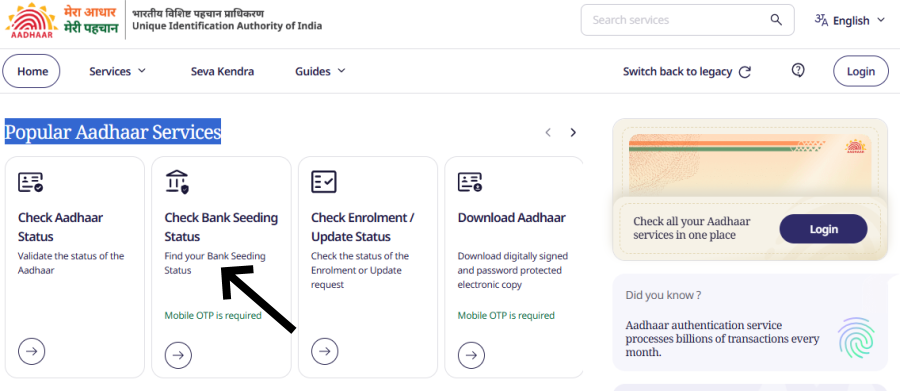
Also note: DBT does not credit joint accounts. If you applied using a joint account, open a new individual account in your own name, get NPCI mapping done on the new account, and update your bank details through the portal or your Anganwadi Sevika.
When you see “MAHABAHIN” or “DBT MMLBY” in your bank SMS or statement, that is your scheme payment. Many women do not recognise the narration and think the money never came.
Conclusion
The Majhi Ladki Bahin Yojana eKYC requires to protect genuine beneficiaries and remove ineligible ones from the list. If you are eligible, completing eKYC correctly is the only thing standing between you and your ₹1,500 monthly payment.
Frequently Asked Questions
Go directly to ladakibahin.maharashtra.gov.in/ekyc – do not go to the login page first. Enter your 12 digit Aadhaar number, verify with the OTP sent to your Aadhaar linked mobile, fill the family declarations carefully (especially A.S. No. 1), and submit. A green confirmation screen confirms success. No password or login is required for eKYC.
This is almost always an NPCI DBT mapping problem, not an eKYC problem. Visit your bank branch in person and ask for the “Aadhaar Seeding & DBT Linkage Form” (Annexure I)
The two most common reasons are: (1) missing the eKYC deadline, and (2) incorrectly answering the A.S. No. 1 declaration during eKYC
If no OTP recieve, than your mobile number is not linked with your Aadhaar.
This message means your Aadhaar number is not in the Ladki Bahin beneficiary database. Do not reapply. Call 181 with your Application ID and Aadhaar number.
eKYC status typically updates within 24 to 48 hours