
Haryana Police Verification can be completed online through the HarSamay portal. Residents can apply for a police character certificate for employment and other official purposes. This guide explains how to apply for Haryana Police Verification online, check the application status, pay the required fee and download the certificate after approval.
When & Why need Police Verification is required
Many government and private employers ask for a Police Character Certificate during the hiring process. It helps them check a person’s background and police records.
You may also need this certificate for other official purposes, depending on the requirements of the organisation.
Haryana Police issues the character certificate after checking the applicant’s details and completing the required verification. The Haryana government also provides an online facility to apply for the certificate through the HarSamay portal.
How to Apply Haryana Police Verification Form Online
To get an online police character certificate, you have to apply through the official website of Haryana Police. This portal is called “हर समय”.
By registering on this Haryana police portal, you can do any work related to the police department through an online mode. Such as online police report, character certificate and you can also file the online FIR of Lost Property etc.
Check step by step process to apply haryana police character certificate request form:
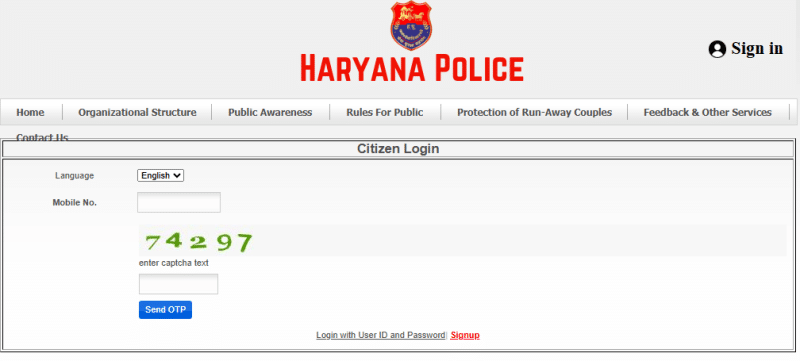
Step 1: Open Haryana Police official web site and click on Citizen Login under Sign In top menu option. Logged in with your mobile number as shown in below image.
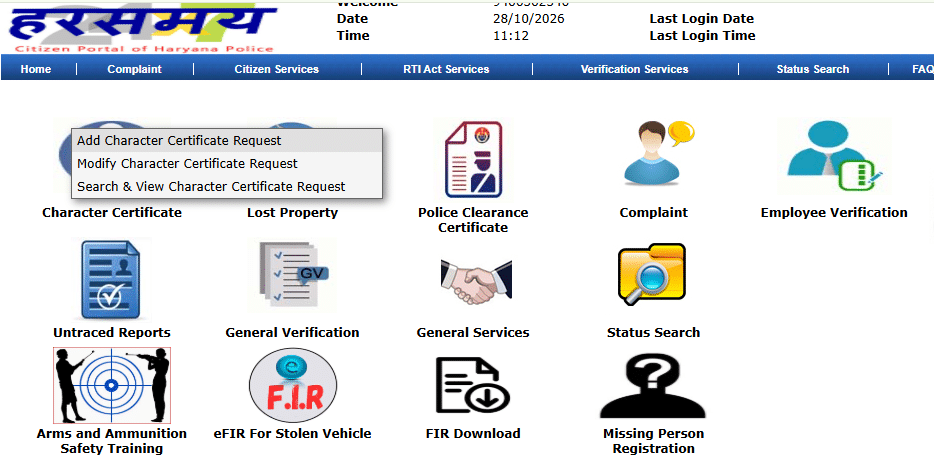
Step 2: As you successfully logged in to the portal, a new window will open on the screen. Now click on the ‘Character Certificate‘ option and choose ‘Add Character Certificate Request’ as shown in this image.
Step 3: After this a Add Character Certificate Request form page will open. Applicant can apply through either Haryana Family ID or Aadhaar card.
If you choose aadhaar card id option then enter your personal details enter your Aadhaar card number, your full name, parents name, or other names of the relative and ID numbers. They will serve as a witness.
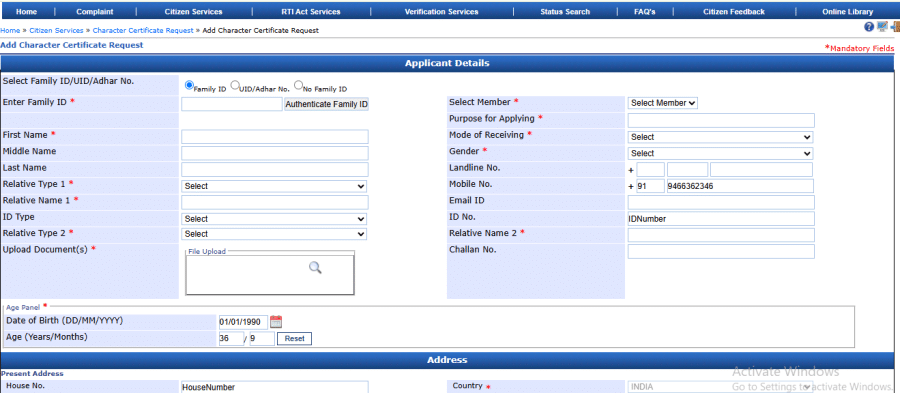
And upload applicant scanned Aadhaar card copy in upload document section.
Step 4: Next, in the option Purpose for Applying, fill the reason for whom do you need a character certificate. For example, if you want police verification certificate for a company, then also write the name of the company.
Step 5: Fill all information in the four section of form, like mobile number, email id, date of birth, address, etc.
Step 6: Choose your District option under Office Submission Details. You do not have to do anything under the Office Name, the name of the sp office of the district comes automatically.
Step 7: Inside the affidavit section, set no for any criminal records.
Step 8: Finally, tick the checkbox ‘All the information provided in the form is true’ and click on SUBMIT button.
Step 9: As soon as you submit, a new page will open in front of you, which shows your Character Certificate request number. And you have to pay fee for it. Click on Proceed with payment link option, you can do payment via Debit/Credit card and Net Banking mode.
Step 10: After successfull payment have to wait approx 3 to 4 weeeks for verify your details. Then You have to login again by your mobile number in the portal to check the status of the application form.
Haryana Police Verification Fee and Processing Time
According to the Haryana Police website, the government fee for a character certificate is ₹50. The published service timeline is 21 days. The actual processing time may vary depending on the verification required. Check the official portal for the applicable fee and application status.
How to Download Haryana Police Character Certificate
After your application got approved, you can download your Haryana Police Verification Certificate online through the HarSamay portal. Follow these steps to check your application status and download the certificate.
1) Open the official HarSamay portal and click on the Citizen Login option. Enter your mobile number for log in.
2) After logging in, go to the Character Certificate section, click on ‘Search & View Character Certificate Request’ option link. Enter your application number, select the required date and click on Search to find your character certificate request.
3) Check your application status. See the Generate Report option is available, click on it to open or generate your character certificate.
4) Download the character certificate in PDF format and save it on your device. You can print a copy for your records and future use.