
PM Kisan 23rd installment was released on 20 June 2026. The 24th installment is expected around October 2026.
You received payments for a while but one installment hasn’t arrived. Or your portal shows a status like “RFT Signed” or “FTO Generated” and you don’t know what it means. Or you simply want to confirm your payment is on track before the next cycle.
The answer is on pmkisan.gov.in and it takes about two minutes.
This guide covers exactly that: how to check your PM Kisan payment status, what every status message on the portal actually means, and what to do when a payment is shown as withheld or pending.
If your status shows a problem, fix it now, the 24th installment is expected around October 2026, and corrections take 2–4 weeks to reflect.
Read detailed guide on: Change your Account Number in PM Kisan.
How to Check PM Kisan Beneficiary Status (Know Your Status)
- Open pmkisan.gov.in on your phone or browser
- Under Farmer Corner, click Know Your Status
- Enter your Registration Number in the field shown
- Enter the captcha code displayed on screen
- Click Get OTP – an OTP arrives on your Aadhaar linked mobile number
- Enter the OTP and click Get Data
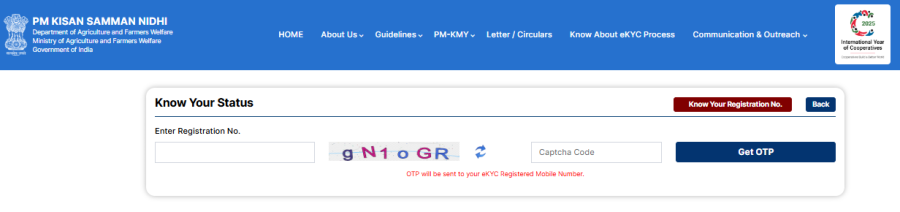
Your screen now shows:
- Your personal and land details as registered
- eKYC status (done or pending)
- Installment-wise payment history from the 1st to the latest
- Current payment status with a reason if any installment is withheld
For a detailed guide on checking the village-wise and gram panchayat-wise lists, including the eGramSwaraj portal method, see: PM Kisan Beneficiary List Village Wise
Forgot Your Registration Number? Here’s How to Find It
On the Know Your Status page, look for the link “Know your Registration No.” and click it.
You will see two options:
- Search by Mobile Number – enter your Aadhaar-linked mobile and the captcha, then verify via OTP
- Search by Aadhaar Number – enter your 12-digit Aadhaar number and the captcha, then verify via OTP
Your registration number will be displayed on screen.
What Each Status Message Means
This is the part most farmers find confusing. The portal uses specific terms that are not always self-explanatory. Here is what each one means:
| Status Message | What It Means | Action Needed |
|---|---|---|
| Waiting for Approval by State | Your data is with the state government, pending review | None – wait 2 – 3 days; it typically moves to RFT Signed next |
| RFT Signed by State | State has verified your records and formally requested the Centre to release funds | None – payment usually follows within a few days |
| FTO Is Generated and Payment Confirmation Is Pending | A Fund Transfer Order has been issued; money is on its way | None – credit to your bank account expected within 2 – 5 working days |
| Payment Success | The government has released funds from its side | Check your bank account; if not credited, contact your bank |
| eKYC Not Done | Your Aadhaar verification on the portal is incomplete | Complete eKYC OTP method on the portal is the fastest |
| Aadhaar Seeding Pending | Your bank account is not linked to Aadhaar for DBT | Visit your bank branch and request Aadhaar bank seeding |
| Installment Withheld | Payment is blocked — usually due to eKYC, Aadhaar seeding, or eligibility issue | Check which specific issue is flagged and resolve it |
| Rejected / Ineligible | Your registration has been rejected, often due to eligibility criteria | Review the exclusion list; contact your Block Agriculture Officer |
| Land Verification Pending | Your land records have not been confirmed yet by the state | Contact your Patwari or Lekhpal to get land records updated |
Important: “Payment Success” on the PM Kisan portal means the government released funds, it does not confirm the money has reached your specific bank account. If the portal shows Payment Success but your account shows nothing, contact your bank directly, as occasional delays happen during batch processing.
How to Raise a Grievance
If you have checked your status, identified no obvious issue, but the payment still has not arrived:
- Go to pmkisan.gov.in → Farmer Corner → Helpdesk – Query Form
- Fill in your registration number, Aadhaar, and a brief description of the issue
- Submit — note the complaint reference number you receive
You can also visit your nearest Common Service Centre (CSC) or your Block Agriculture Office with your Aadhaar card and registration number. The block-level officer has access to your account details and can identify exactly where the process is stalled.
Conclusion
Checking your PM Kisan Samman Nidhi status takes about two minutes at pmkisan.gov.in → Know Your Status. The portal tells you exactly where your payment stands and flags the specific reason if anything is held.
The most important thing to act on right now, before the 24th installment arrives around October 2026: check that your eKYC is marked as done and your bank account is Aadhaar. Those two issues together account for the large majority of withheld payments.
If your status shows a problem you cannot resolve yourself, the Helpdesk Query Form on the portal or a visit to your nearest CSC are the fastest paths to getting it fixed.
For the latest scheme updates, always verify at the official government website: pmkisan.gov.in.