
If you are selling a property, getting a home loan, or registering a sale deed in Haryana, one document that always comes up is the Property Tax No Dues Certificate, commonly called NDC. Without it, most property transactions simply get stuck.
The good news is that you do not need to visit any government office. The entire process, from checking pending dues to download the no due certificate is available online through the Haryana government’s ULB portal.
When Do You Need an No Due Certificate in Haryana?
You will be asked to submit a Property Tax No Dues Certificate in four main situations:
- Property sale registration – the sub-registrar’s office requires it
- Mutation in municipal records – after a property changes hands
- Home loan sanction or disbursal – banks ask for it to confirm no dues
- Building plan approval or new utility connection – some municipal offices ask for it
How to Generate Property Tax No Dues Certificate Online
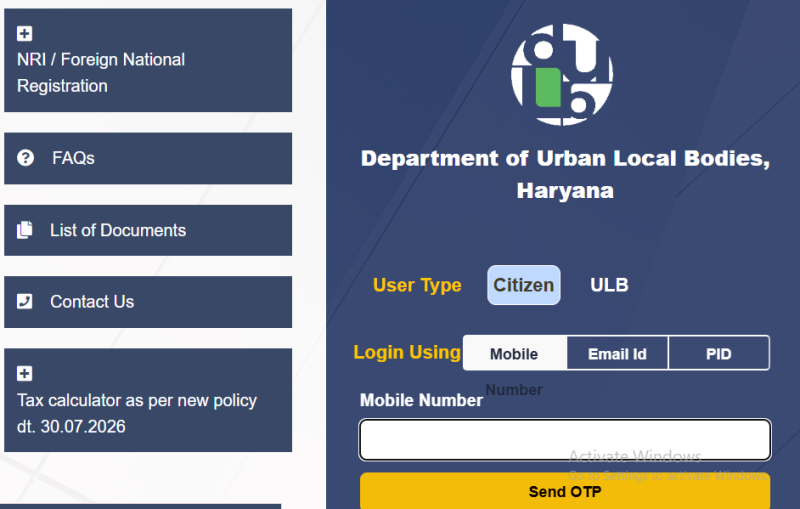
Step 1: Log In Open property.ulbharyana.gov.in in your browser. Select login type as ‘Citizen’ and enter your registered mobile number. An OTP will arrive on your phone. Enter it and click ‘Verify OTP & Submit’.
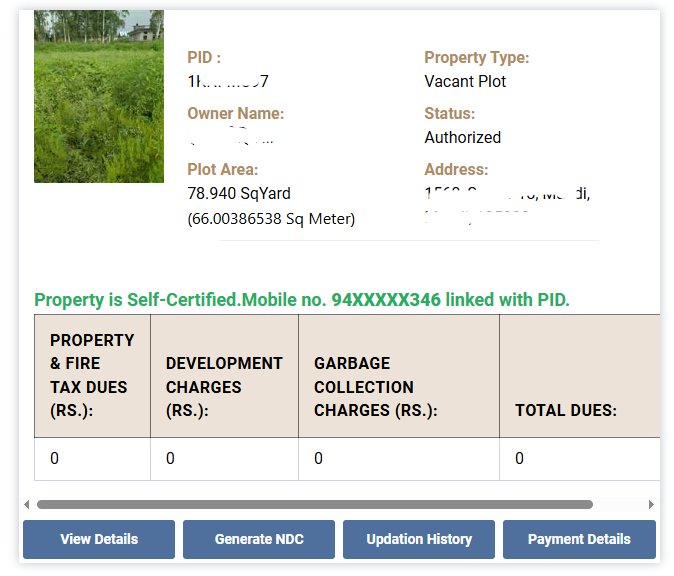
Step 2: Associated properties with your account shown on the page, here you can check all prodpery details like property id, plot area, status, owner name and address.
Now click on ‘Generate NDC’ button to get your no due certificate.
Step 3: After this you will redirect to property search page, here you can search your property with its ID number. Click on ‘Pay All Due and Generate NDC’ button.

The portal will show a breakup of all pending dues property tax, fire tax, water and sewerage charges, solid waste charges, and development charges. You can pay all dues together online via UPI, debit card, or credit card. Partial payments are also allowed for some charges, but a full clear is required before the NDC is issued.
Step 4: Once payment is confirmed and the outstanding balance on your Property ID reads zero, the ‘Download NDC’ button becomes active.
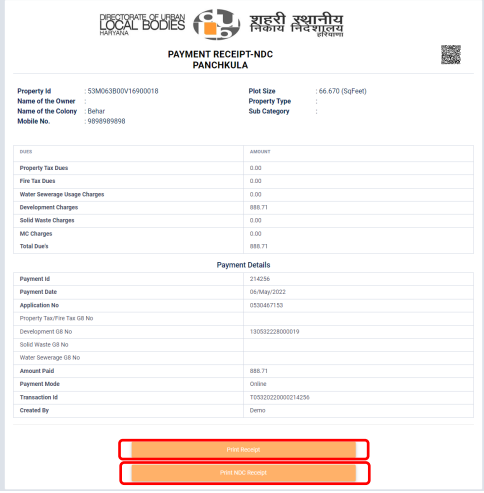
Click it to download your Property Tax No Dues Certificate as a PDF. There is no separate fee for the certificate itself, you only pay the tax dues.
Read our guide on: How to Pay Gram Panchayat Property Tax Online
What Charges Does the NDC Covers?
The NDC confirms that the following municipal charges have been fully cleared:
- Property or House tax
- Fire Tax
- Water supply and sewerage charges
- Solid Waste Charges
- Electricity bill
- Development charges
If Your Property Is Not Found on the Portal
If the portal returns no results when you search, there are three common reasons:
1. Property is not on the municipal roll This happens with properties in recently urbanised areas or colonies regularised after the database was last updated. You will need to create a new Property ID through your local ULB office before you can proceed online.
2. Two Property IDs exist for the same plot This can happen when a plot was split between family members or two units were merged. Both records need to be reconciled at the municipal office before a clean NDC can be issued.
3. Property ID exists but under a different mobile number If the property was registered under a previous owner’s mobile number, search by Property ID or owner name instead of mobile number.
For corrections that cannot be done online, you will need to visit the municipal office (ULB counter) with documents such as the sale deed, site plan, building sanction, earlier tax receipts, and a photo ID.
FAQs:
No, its free to download.
For online payments, the NDC is generated almost immediately once all dues are cleared.
Yes.
The portal allows partial selection of charges. However, the NDC will only be issued when the total outstanding balance is nil.
Yes you can.
Login is required to access property details and make payment.