
The Shala Darpan Internship is a mandatory teaching training program for B.Ed, D.El.Ed, and integrated course students in Rajasthan. Students apply through the official portal at rajshaladarpan.rajasthan.gov.in, fill school preferences, lock choices, and join the allotted government school after downloading the allotment letter.
The entire process runs online through the Integrated Shala Darpan portal managed by the Rajasthan Council of School Education (RCSE) and developed by the National Informatics Centre (NIC).
This guide walks you through everything from creating your candidate login to reporting at your allotted school on the first day.
What is Shala Darpan Internship?
The Shala Darpan Internship is a school based practical training program run by the Rajasthan government’s School Education Department. It is hosted on the Integrated Shala Darpan portal the same platform used to manage teacher profiles, student data, and school administration across all government schools in Rajasthan.
Through this internship, student teachers are placed in government schools where they observe classroom teaching, assist teachers, learn school administration, and gain hands-on experience with the state’s digital education systems.
The program is mandatory for:
- B.Ed. 1st and 2nd Year
- D.El.Ed. (BSTC) 1st and 2nd Year
- B.A.B.Ed / B.Sc.B.Ed 3rd and 4th Year
- B.Ed-M.Ed 1st and 2nd Year
The internship is conducted in two rounds each academic session. Colleges are allotted a phase (Round 1 or Round 2) by the RCSE, and students fill their school preferences accordingly.
How Students Apply for Shala Darpan Internship Rajasthan
To join the Shala Darpan Internship, students have to follow certain steps:
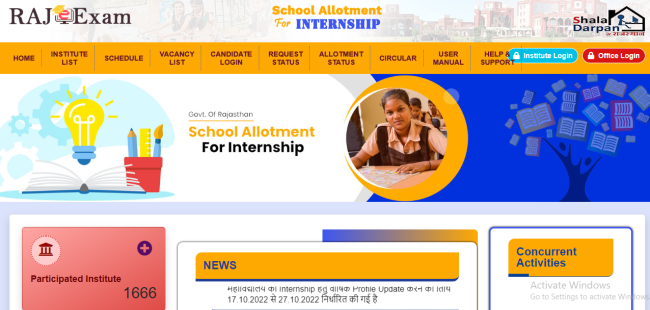
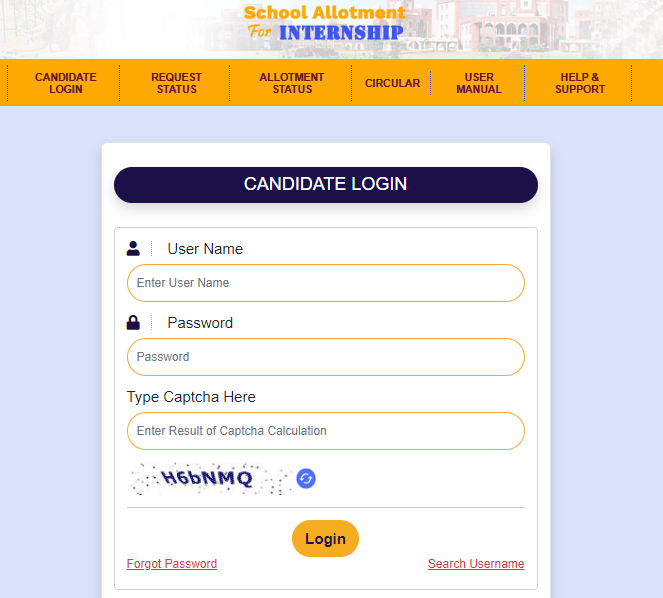
1) First of all, visit the official website of Shala Darpan Portal. Then you have to click on Candidate Login in the top menu. You can also go directly to this page through this link: https://rajshaladarpan.nic.in/RajEExam/InternShipNew/Home/CandidateLogin.aspx
2) Login in this portal with the help of your username and password. If you have forgotten your username or password, you can retrieve it by using Forgot your password?
3) Now click on the Internship details option on the home page. Here you will find detailed information about the internship program and application process.
Before applying for the internship, students must check the eligibility criteria. Eligibility criteria may vary depending on the specific requirements of the project and area of expertise. Students must ensure that they fulfil the eligibility criteria before applying for the internship.
4) Once the students check the eligibility criteria, they can apply for the internship by submitting their application online. In the application form, students will be required to provide their personal details, educational qualification, area of specialisation and other relevant information.
5) Once the application is submitted, students have to wait for the School Allotment Letter List.
Once selected in the internship, the students will be informed about the commencement date of the internship. You can also check your Allotment Status by visiting the shala portal directly.
Before starting the internship, students will have to attend an orientation program. The Orientation Program will provide the students with an overview of the Shala Darpan Portal and its functionalities.
Benefits of the Internship
- Hands-on teaching experience in a real government school
- Practical knowledge of classroom management and lesson planning
- Exposure to how schools use Shala Darpan for attendance, reports, and administration
- Understanding of government educational schemes and their implementation
- Internship completion certificate required for degree finalisation
- Counts toward REET eligibility and future teaching job applications
- Networking with principals, teachers, and District Education Officers
Documents Required
Before you start filling the online application, keep these documents ready:
| Document | Purpose |
|---|---|
| Aadhaar Card | Identity verification |
| College ID or admission letter | Proof of enrolment |
| Passport-size photograph | Profile upload |
| Course marksheet / result | Academic details |
| Mobile number linked to Aadhaar or college records | OTP and login credentials |
Note: Your college HOD (Head of Department) is responsible for registering you on the internship portal. If your profile is missing, contact your HOD immediately, you cannot self register on the main portal.
How to Fill School Preferences
This is the most important step. Mistakes here can leave you unallotted.
- After login, go to the “Internship Request” section on your dashboard
- Select your district and block where you want to do the internship
- Browse the available schools. Use the Vacancy List (available publicly on the portal homepage) to check seat availability before selecting
- Select at least 15 schools. Students who select fewer schools have a much higher chance of getting “No Allotment”
- Arrange your preferred schools in order of priority
- Click “Save”, but do not stop here
- Click “Lock Choice” this is mandatory. If you only save without locking, the system will ignore your application entirely
Critical: Once you lock your choices, you cannot change them. School change is allowed only once after allotment, through Candidate Login, subject to seat availability. After that, no changes are possible at any level.
Also Read:
Palanhar Yojana Renewal and Payment Status
Rajasthan Anandam Scheme for Students
Joining Process After Allotment
Step 1: Download the Allotment Letter
- Log into the Candidate Login
- Click on “Internship Request” tab → “Allotment Status”
- If allotted, your school name and details will appear
- Download the Allotment Letter from the portal
Step 2: Collect Documents from Your College
Before reporting to the school, collect these from your college:
- College Relieving Letter (original)
- Internship Diary (issued by your college)
Step 3: Report to the Allotted School
Report to the school within the deadline mentioned on your allotment letter. Generally, joining must happen within 7 to 10 days of allotment.
Step 4: Get Your Joining Marked on the Portal
This step is critical. Ask the school Principal to mark your “Joining” on the Shala Darpan portal. If the Principal records your joining only in the physical register but not on the portal, your internship days will not be counted toward your degree.
Confirm with your principal that the digital joining entry has been done before you leave on day one.
How to Check Shala Darpan Internship Allotment Status
You can check your status in two ways:
Method 1 : Through Candidate Login:
- Open
rajshaladarpan.rajasthan.gov.in/SD2/InternShipNew/Home/Home.aspx - Click Candidate Login
- Enter username, password, and captcha
- Go to Internship Request → Allotment Status
Method 2 : Without Login (Public Status):
- On the portal homepage, click “Allotment Status” in the navigation
- Enter your application number or registered mobile number
- Your current status will be displayed
Contact and Help & Support
The official Help & Support page for the Shala Darpan Internship is:
https://rajshaladarpan.rajasthan.gov.in/SD2/InternShipNew/Home/Contact.aspx
Office Address:
Rajasthan Council of School Education (RCSE)
603 (Old 505), 5th Floor, 5th Block,
Shiksha Sankul, J.L.N. Marg, Jaipur – 302017 (Rajasthan)
Email: [email protected]
For portal-related technical issues, use the “Help Centre Module – School Issues” option available under School/PEEO login.
Conclusion
The Shala Darpan Internship process is fully online and well structured but there are a few steps where students commonly go wrong. The two most critical ones are: always locking your choices (not just saving), and ensuring your joining is marked on the portal by the school principal on day one.
Start by checking the official internship schedule to confirm your course’s current phase window. Log in on time, fill a wide range of school preferences, lock them before the deadline, download your allotment letter, and report to school with all three required documents.
For any issues, use the official Help & Support page or call the Shala Darpan helpline at 0141-2700872.
FAQs:
Yes. It is mandatory for all B.Ed, D.El.Ed (BSTC), and integrated course students in Rajasthan.
No. Your college (institute) registers you through the Institute Login.
Select at least 15 schools.
You can request a school change once through Candidate Login, provided seats are available at another school. Once the change is done, no further changes are allowed.
Generally 7 to 10 days from the date of allotment, as mentioned on your allotment letter.
Your internship days will not count for your degree if digital joining is not recorded.