
CEIR IMEI Verification is a free government service that helps you to check the mobile IMEI number. You can simply send KYM [space] [15-digit IMEI] to 14422 by SMS. You will get the phone’s details and status within a few seconds.
You can also check the genuineness of your mobile handset using the official Sanchar Saathi CEIR Portal or via official KYM (Know Your Mobile) SMS service. If the result shows that the phone is blacklisted, duplicate, or already in use, it is better not to buy that phone.
What is IMEI Number?
IMEI stands for International Mobile Equipment Identity. It is a unique 15-digit number that is used to identify a mobile phone.
You can usually find the IMEI number on the phone, the original box, or the purchase bill. If you have a dual-SIM phone, it will usually have two IMEI numbers, one for each SIM slot.
How to Check Mobile IMEI Number in CEIR Portal
If you already have the phone’s IMEI number, you can check it online using the Government of India’s KYM/CEIR service. You don’t need to download any app.
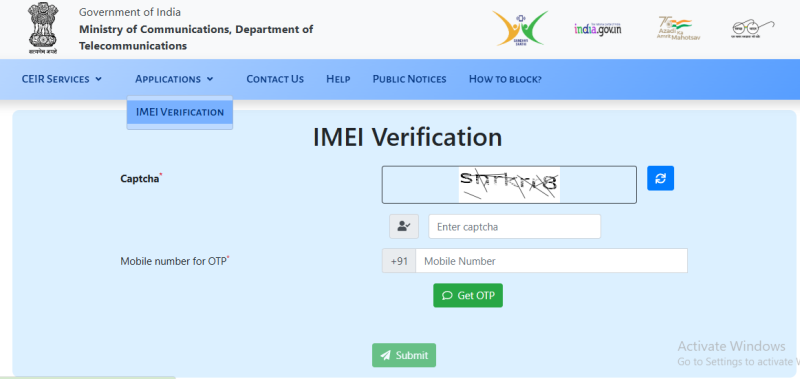
CEIR IMEI Verification – Know Genuineness of Your Mobile Handset
The official CEIR website lets you check an IMEI using your mobile number. You just need to complete the CAPTCHA, verify your number with an OTP, and enter the IMEI number.
- Open the CEIR IMEI Verification page.
- Enter the CAPTCHA shown on the screen.
- Enter your 10-digit mobile number and click Get OTP.
- Enter the OTP you receive and click Verify OTP.
- Enter the phone’s 15-digit IMEI number and click Submit.
- You’ll then see the phone’s details, such as the manufacturer, brand, model, device type, and IMEI status.
Keep your mobile phone with you because you’ll need it to receive the OTP. The whole process usually takes only a couple of minutes.
Check IMEI on CEIR Sanchar Saathi
If you don’t have internet access, you can check your phone’s IMEI by SMS. It’s a quick and easy method.
- Open the Messages app on your phone.
- Type KYM, then a space, followed by your 15-digit IMEI number.
Example:KYM 123456789012345 - Send the SMS to 14422.
You’ll get a reply with details such as the manufacturer, brand, device type, model, and IMEI status.
The government service is free, but your mobile operator may charge you for sending the SMS.
Verify IMEI Using the Sanchar Saathi App
You can also check your phone IMEI using the Sanchar Saathi app from the Department of Telecommunications (DoT). The app is available on both Android and iPhone.
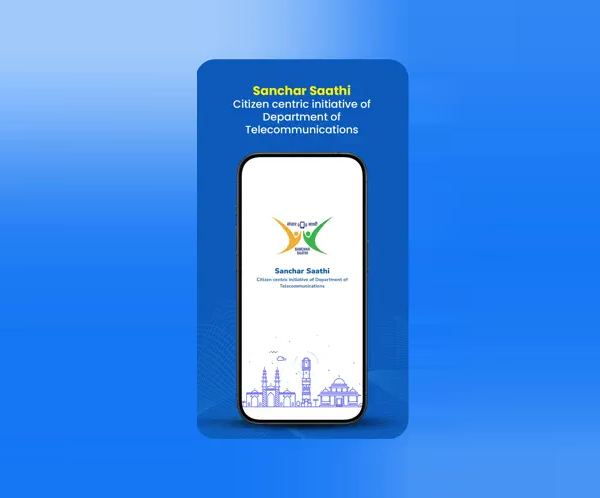
Download the Sanchar Saathi app from the Google Play Store or Apple App Store. Search for “Sanchar Saathi.” Get register with your mobile number and check Know Your Mobile (KYM) or Verify IMEI.
Read our full guide: How to Download and Use the Sanchar Saathi App
How to Find Your Mobile IMEI Number
Before checking your phone’s IMEI, you first need to find the 15-digit IMEI number. There are a few easy ways to find it.
Dial *#06#
Open the phone’s dialler and type *#06#. You don’t need to press the call button. The IMEI number will appear on your screen within a few seconds.
If your phone supports two SIM cards, you may see two IMEI numbers, usually shown as IMEI 1 and IMEI 2.
Check Your Phone Settings
You can also find the IMEI in your phone’s settings.
On most Android phones, such as Samsung, Oppo, Vivo, Realme, and Xiaomi, go to Settings → About Phone or Settings → About Device. You should find the IMEI number there.
On an iPhone, go to Settings → General → About and scroll down until you see the IMEI.
Check the Phone Box or Bill
The IMEI number is usually printed on a sticker on the original phone box. It may also be mentioned on your purchase bill or invoice.
If you’re buying a second-hand phone, check the IMEI on the box and compare it with the IMEI shown on the phone using *#06#. Both numbers should match. If they don’t match, it’s better to be careful before buying the phone.
What information does IMEI show?
When you check a phone IMEI on the CEIR website, you will see basic details about the mobile device.
The result can show:
Manufacturer: The company that made the phone.
Brand: The phone brand, such as Samsung, Vivo, or Apple.
Device type: For example, smartphone, feature phone, or tablet.
Model: The exact phone model.
IMEI status: It tells you if the IMEI is valid, blacklisted, duplicate, already in use, or invalid.
If you are buying a used phone, this check can help you make sure the phone details match what the seller has mentioned. If the brand or model is different, be careful before buying.
What is IMEI number status?
The IMEI status tells you correct information about the device. Here’s what the common results mean.
No Problematic Status
This is a good result. IMEI does not have one of the problems highlighted by the CEIR/KYM service. Still, check the phone and its bill before buying.
Blacklisted IMEI
The phone has been reported as lost or stolen and may be blocked from Indian mobile networks. Do not buy the phone.
Duplicate IMEI
This means the same IMEI has been detected on more than one device. A duplicate IMEI can indicate that the IMEI has been cloned or improperly assigned.
Already in Use
This status means the IMEI is already associated with a device being used on a mobile network. If the seller says the phone is new or unused, this is a warning sign. Check the phone carefully before buying.
Invalid IMEI
The IMEI is not valid, so the phone may not work properly on Indian mobile networks. If you see this on your own phone, contact the manufacturer or an authorised service centre.
How to Find IMEI Number on Samsung, Oppo, Vivo and Other Phones
You can find the IMEI number on almost any phone in the same simple way. Just dial *#06#, and the IMEI will appear on the screen.
You can also find it in the phone settings. The menu name may be a little different depending on the phone brand.
Samsung: Settings → About phone → Status information → IMEI information
Oppo: Settings → About device
Vivo: Settings → About phone
Realme, Xiaomi, OnePlus and other Android phones: Settings → About Phone
iPhone: Settings → General → About → IMEI
Once you have the IMEI number, you can check it using the KYM/CEIR website or SMS service.
How to Check IMEI on a Dual SIM Phone
A dual SIM phone has two IMEI numbers.
You will see:
IMEI 1
IMEI 2
Find both IMEI numbers details carefuly before buying a dual SIM phone. If found any one has issue than do not buy that phone.
Verify IMEI Before Buying a Used Phone
If you are buying a second hand phone, must verify IMEI number before it. Follow these simple steps:
1. Ask the seller for the IMEI: A genuine seller does not have any problem to share with you.
2. Check yourself: Check the IMEI directly on the phone by Dial *#06#
3. Compare the numbers: Match the IMEI number display on phone with the number on the original box and invoice. They should match.
4. Check IMEI number online or by SMS: Use the KYM/CEIR service and check the result before buying the phone.
5. Check both IMEIs on dual SIM phones: If the phone has two SIMs, check both IMEI numbers.
6. Check the IMEI label: If the IMEI sticker on the box is missing, damaged, or scratched, be careful about it.
7. Do not buy a blacklisted or duplicate IMEI phone: If the KYM/CEIR result shows blacklisted, duplicate, or already in use, does not take it.
Difference between TAFCOP vs CEIR
Both TAFCOP and CEIR are available on the same sancharsaathi.gov.in portal and both are run by the Department of Telecommunications. But they use for different purposes.
TAFCOP sanchar saathi is used to check how many mobile connection are currently registered in your name across all telecom operators in India. If someone has misused your Aadhaar to get a SIM without your knowledge, you can report it via TAFCOP.
CEIR sanchar saathi is used to know genuineness of your mobile handset. It verify mobile devices by their IMEI number. If your phone is lost or stolen, you can block via CEIR and it stops working on every network in India. Before buying a second hand phone, you can also use CEIR to verify whether that device has been reported stolen or has a duplicate IMEI.
Can You Track a Phone Using Its IMEI?
No, you cannot track the live location of a phone using KYM or an IMEI number. The KYM/CEIR check only shows information about the phone and its IMEI status.
If your phone is lost or stolen, you can use the CEIR service to block the phone so it cannot be used on Indian mobile networks.
You can also read our guide on: How to block a lost or stolen phone using CEIR.
Is the KYM IMEI Check Free?
Yes, its completely free. The Government of India does not charge anything for the KYM/CEIR IMEI verification service.
The only possible cost is a standard SMS charge from your telecom operator for the 14422 message.,this depends on your plan. The web portal at ceir.sancharsaathi.gov.in has no fees.
What to Do If You Bought a Phone With a Problematic IMEI
If you have already bought a phone and later find that its IMEI has a problem, don’t panic. Here’s what you can do.
1. Check the IMEI status.
If the IMEI is blacklisted, the phone may be blocked from Indian mobile networks.
2. Keep your documents safe.
Save the purchase bill, payment receipt, seller’s details, and any messages or chats with the seller.
3. Contact the seller.
Tell the seller about the IMEI problem and ask for a refund. Share the proof of purchase if needed.
4. Contact the police if necessary.
If the seller refuses to help or you think the phone may be stolen, take your documents and file a complaint with the police.
5. Do not change the IMEI.
Never try to change or modify the IMEI yourself. Also, be careful with repair shops that claim they can remove a blacklist or fix the IMEI.
Conclusion
Checking a phone’s IMEI is quick and easy. It usually takes only a few minutes and can help you avoid buying a stolen, cloned, or blocked phone. First, find the IMEI by dialing *#06#. Then check it using the KYM service by SMS or through the CEIR website. If the result shows a problem, or the IMEI on the phone does not match the box or bill, it is better not to buy the phone.
If you are checking a dual SIM phone, make sure you check both IMEI numbers. Don’t simply trust what the seller tells you, check the IMEI yourself. If you want to check which mobile numbers are registered in your name, you can use the TAFCOP portal. To report a suspicious or fraud call or SMS, you can use the Chakshu portal.
FAQs:
Yes, it is completely free. The SMS to 14422 may cost standard messaging charges
It will provide the manufacturer, device type, brand name and model number, along with the IMEI status
It means the same IMEI number is registered to more than one device. This usually indicates the phone has a cloned. Avoid buying such a device.
Check both. Each IMEI corresponds to one SIM slot. Both should come back as genuine.
In some cases, a blocked phone can be unblocked through the official CEIR process if it has been recovered. The person who originally reported the phone lost or stolen needs to follow the required unblocking procedure. A buyer should not try to remove or change the IMEI.
No, an IMEI check does not provide a live location of your phone.