
To download birth certificate online, go directly to dc.crsorgi.gov.in/crs/dwnld – the official CRS download page. Enter your Application reference number (URN), verify the OTP sent to your registered mobile number, and the digitally signed PDF will download instantly. No login is required on the download page.
If you do not have a URN yet, you need to log in to your CRS account first, search your birth record, and pay the applicable fee to generate one.
Read our guide on: Apply for new birth certificate online & offline in India.
What You Need Before You Start
Keep these ready before opening the portal:
- URN (Unique Reference Number) – issued after fee payment on the CRS portal. Check your email, SMS, or previous CRS session for this number.
- Registered mobile number – the OTP is sent to the mobile number linked to the birth registration record, not necessarily your CRS account number.
- If you don’t have a URN yet: your CRS login credentials, child’s date of birth, parents’ names, and state/district of registration.
How to Download Birth Certificate Online with URN (Quick Method)
This is the direct route. No login needed.
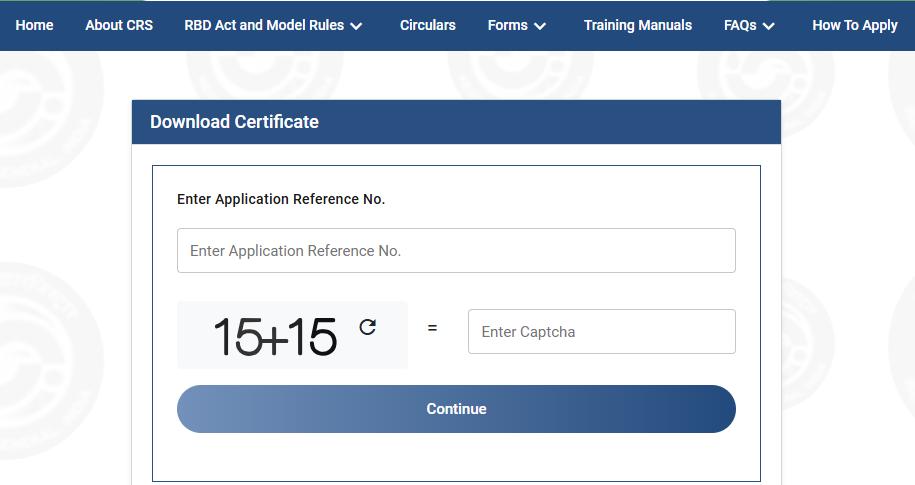
(a) Open dc.crsorgi.gov.in/crs/dwnld in your browser (Chrome, Edge, or Firefox recommended).
(b) Enter your Unique Reference Number (URN) in the field provided.
(c) Click Continue.
(d) An OTP is sent to the mobile number linked to the birth registration record. Enter the OTP and click Verify OTP.
(e) Once verified, the birth certificate PDF downloads automatically. Save it to your phone or computer.
That’s it. The downloaded PDF carries a digital signature and QR code and is legally valid for all domestic purposes.
Important: The OTP goes to the mobile number recorded at the time of birth registration, which may be the hospital’s number or your parent’s number, not your CRS login number. If you are not receiving the OTP, see the section below.
Download via DigiLocker
In states where DigiLocker is integrated with the CRS, birth certificates registered on or after October 2023 may already be available in your DigiLocker account, no separate download needed.
Steps:
- Open digilocker.gov.in or the DigiLocker app
- Log in with your Aadhaar linked mobile number
- Go to Issued Documents
- Look for Birth Certificate under your state government or municipal body
If it appears here, you can share or directly download birth certificate online. Schools, passport offices, and most government departments accept DigiLocker linked certificates without requiring a physical copy.
If the certificate is not visible in DigiLocker, use the direct download method at dc.crsorgi.gov.in/crs/dwnld instead.
Download Birth Certificate via QR Code on Hard Copy
If you already have a hard copy of birth certificate (issued by a hospital, municipality, or Gram Panchayat), check if it has a QR code or barcode printed on it.
Scan this QR code using your phone’s camera or any QR scanner app. It should open a link to the CRS verification page where the digital copy of the certificate can be viewed and saved.
This works only if the physical certificate was issued through the CRS system and the QR code is intact. Older certificates issued before the CRS went digital may not have a working QR code. In that case, use the direct download method or visit your local registrar’s office.
Is the Downloaded Certificate Legally Valid?
Yes. A birth certificate downloaded from dc.crsorgi.gov.in is legally valid. It carries a digital signature from the issuing authority and a QR code that links to the CRS verification system. Under the Information Technology Act, 2000, digitally signed documents are treated as equivalent to physically signed ones.
This digital PDF is accepted at schools, passport offices, banks, insurance companies, Aadhaar enrolment centres, and government offices.
Conclusion
Downloading a birth certificate from the CRS portal is straightforward once you know the right page. Go directly to dc.crsorgi.gov.in/crs/dwnld, enter your URN, verify the OTP, and the PDF downloads immediately, no login, no navigation through menus.
The only extra step is when you don’t have a URN yet. In that case, log in to the CRS portal, search your record, pay the fee, get the URN, and then use the download page.